Scaling content creation is not easy.
The majority of marketers and businesses struggle with creating a functional content scaling strategy. It has a lot of moving parts and requires a lot of capital.
When the time comes, you have to do it.
You can either do it the wrong, hard way. Or, you can read this guide to scale content creation strategically at the right time with precision.
What is Content Scaling?
Content scaling refers to the systematic process of increasing content production for your business. It isn’t limited to just one form of content, it covers all content formats across all channels such as blog posts, videos, images, etc.
As your business grows, you need to publish more content to engage with your audience on all possible touchpoints. There comes a point when you have to generate a lot of different content pieces on a daily basis.
More content means you need to:
- Repurpose content more often
- Refresh content regularly
- Run content audits
- Improve efficiency.
This is a reason you need a robust content scaling system.
Content scaling doesn’t always mean more volume. It is more about quality content.
Why Scaling Content Creation is Important for Your Business
Creating more quality content offers your business a lot of benefits. Scaling it is a need for your business, and here’s why:
- More content means more impressions. You can reach more eyeballs as you scale content creation. This leads to high brand awareness and more clicks.
- It helps you keep content fresh by updating and renewing it regularly. Google prefers fresh content in SERPs, whereas AI engines cite fresh content 25.7% more than old content.
- Content scaling helps improve user experience. You can publish quality content across all touchpoints which is exactly what users today demand. They get to see a variety of content formats from your brand instead of just one type of content.
- You get more traffic, leads, and sales. When you publish purpose-driven content at scale with proper CTAs, the end result is more traffic and leads. This is because you are not just targeting specific keywords and generating content randomly, but rather you follow a systematic content creation approach.
- Scaling content creation using the right tools and resources saves you a lot of time. Up to 80% of marketers use AI for content creation successfully. It doesn’t just save time and resources, but it also improves ROI.
How to Scale Content Creation: Developing a Strategy
Scaling content creation requires developing a robust, documented strategy that focuses on content production using AI, tools, and humans.
Here’s how to develop a strategy for scaling content creation:
Set Goal
Like any other strategy, content scaling should have a well-defined objective and purpose. You shouldn’t do it just because everyone else in your industry is doing it.
Start by setting a clear goal using the SMART framework when your business is ready for content scaling.
How to decide if your brand is ready to scale content?
These are the indicators when you are set for scaling content creation:
- You have published ample content across channels
- Your target audience is well-defined with data-driven buyer personas
- The content has a positive ROI and you know the top performing content formats and channels.
If you are still struggling with content creation, have a limited budget, and don’t have an established foundation for content strategy, scaling isn’t a good option for you.
Once you have finalized your brand is ready for scaling content creation, you need to define a clear goal.
Yes, you need to increase content production, but what’s the ultimate goal you want to achieve with increased content volume?
- Do you want to increase referral traffic?
- Are you interested in improving search visibility?
- Do you want to boost brand awareness?
Use the SMART framework to create a specific, actionable, and measurable goal for your content scaling strategy:
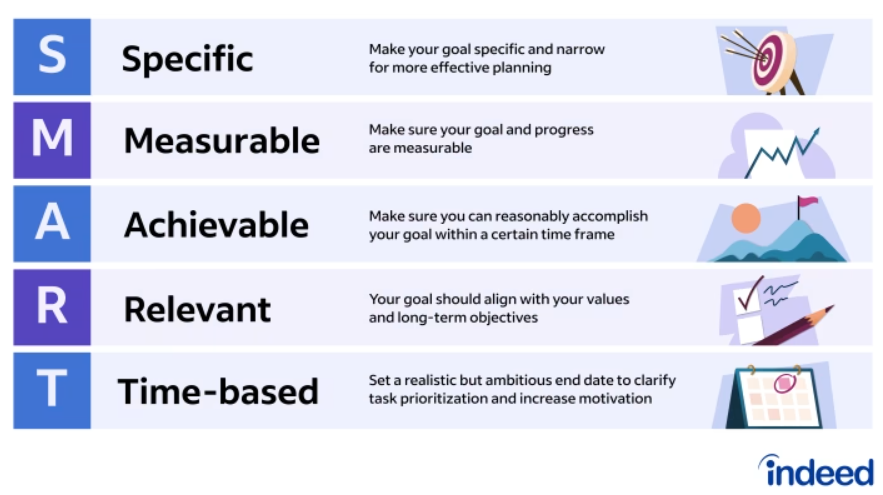
A well-defined, documented, and data-driven goal that’s aligned with your brand’s marketing strategy will help you achieve content marketing objectives. It must work with your existing content marketing strategy.
Perform Content Audit
Once you are done with goal setting and know what you want to achieve with scaling content creation for your brand, the next step is running a content audit.
It is a process where you review all the existing content that your business has published across all channels. The idea is to find track performance and see where you currently stand. The content audit helps you make informed decisions about:
- What content to keep and remove
- Content that needs to be revised or updated
- Type of content you need to create more or less often based on its performance.
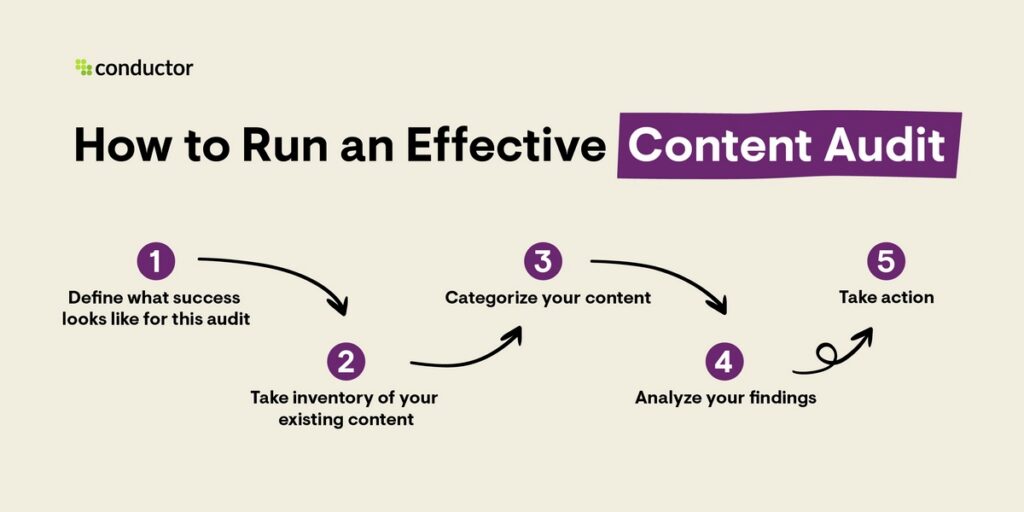
Here’s how to do a content audit for scaling content creation:
- The goal of the content audit is to figure out where you stand currently and what type of content to scale and at what channels (based on their performance).
- Collect and compile a list of content inventory. This includes all the content pieces you own or are linked to.
- Add performance data of each content type in the sheet along with URLs. The common metrics to include are views/reads/impressions, clicks, CTR, keyword ranking/position, number of backlinks, and referral traffic.
- Analyze content based on its success. Decide if the content needs to be replaced, refreshed, or merged.
- Take action by adding relevant details to the editorial calendar. For instance, content pieces that need to be updated should be added to the editorial calendar with relevant details.
Create an Editorial Calendar
The data from the content audit should be fed into the editorial calendar for further processing.
An editorial calendar is an essential part of a content scaling strategy. It is a centralized sheet or a tool that is used to plan, organize, and schedule content for your business. This is where you manage all types of content creation and scaling for your business.
Here’s an example of an editorial calendar:
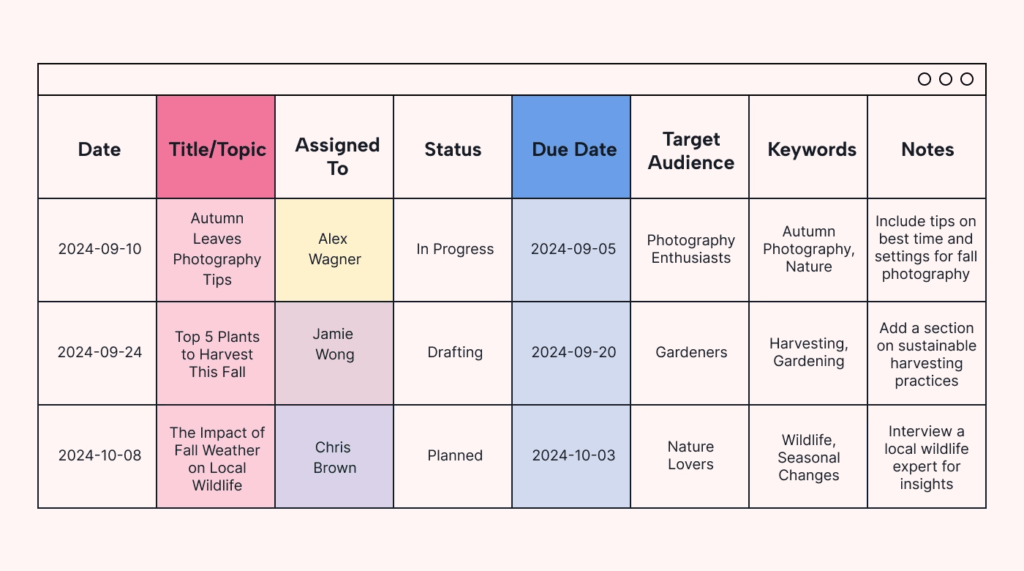
You can create it in Excel, use a template, or use a tool like Airtable or Notion. The essential components of an editorial calendar are: Topic/title, content and its format, channel, publication date, author, editor, content purpose, keywords, status, and URL.
When you are scaling content, you can’t do it without an editorial calendar. It organizes content and acts as a centralized hub for all types of content production.
If you are churning out 3-5 content pieces a week, you can do it without an editorial calendar. But scaling it becomes a challenge if you don’t stay organized.
Use the Right Tools
Scaling content creation requires a decent tech stack with the right apps.
If you are trying to do it all yourself manually, you won’t get too far.
You need access to the right tools, AI apps, and automation to scale content for exponential growth. Here’s a breakdown of the types of tools needed:
- Content generation tools such as ChatGPT or Copy.ai
- Content repurposing platforms like Descript
- SEO apps like Ahrefs that help with keyword research, optimization, rank tracking, and much more
- Design and visual content creation apps like Canva
- An editing tool like Grammarly
- An analytics tool like Google Analytics 4
- Project management app for collaboration and managing content creation and publication such as Trello or Slack
- Integration tool to automate workflows and integrate apps and tools. Zapier is a decent choice.
Depending on your business, niche, and size, you might need several other tools.
You should create a centralized system for scaling content creation where all the apps work together collectively (instead of creating silos).
Build the Right Team
Having the best apps for scaling content creation solves half the problem. The other half is handled by your team.
You can’t run content scaling on full automation without humans.
The best content is always generated by humans. People first content, which search engines like and content that adheres to E-E-A-T guidelines, should either be created or supervised by humans (preferably by subject matter experts):
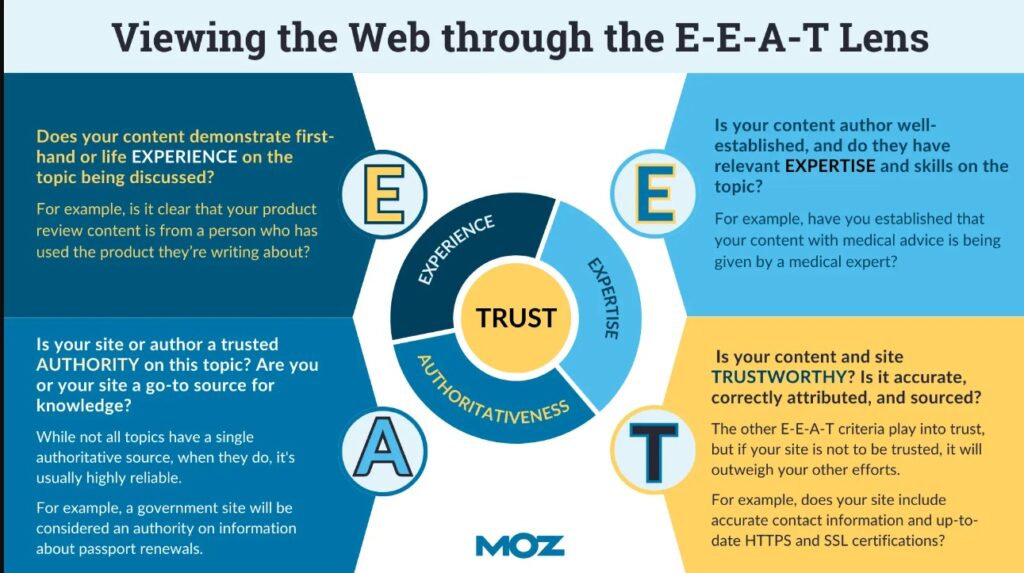
You need:
- Human content creators (ideally subject matter experts) who supervise AI content generation or create content from scratch
- Content strategist
- At least one editor
- At least one designer
- SEO expert
- Video creator and editor
- Team lead or content head.
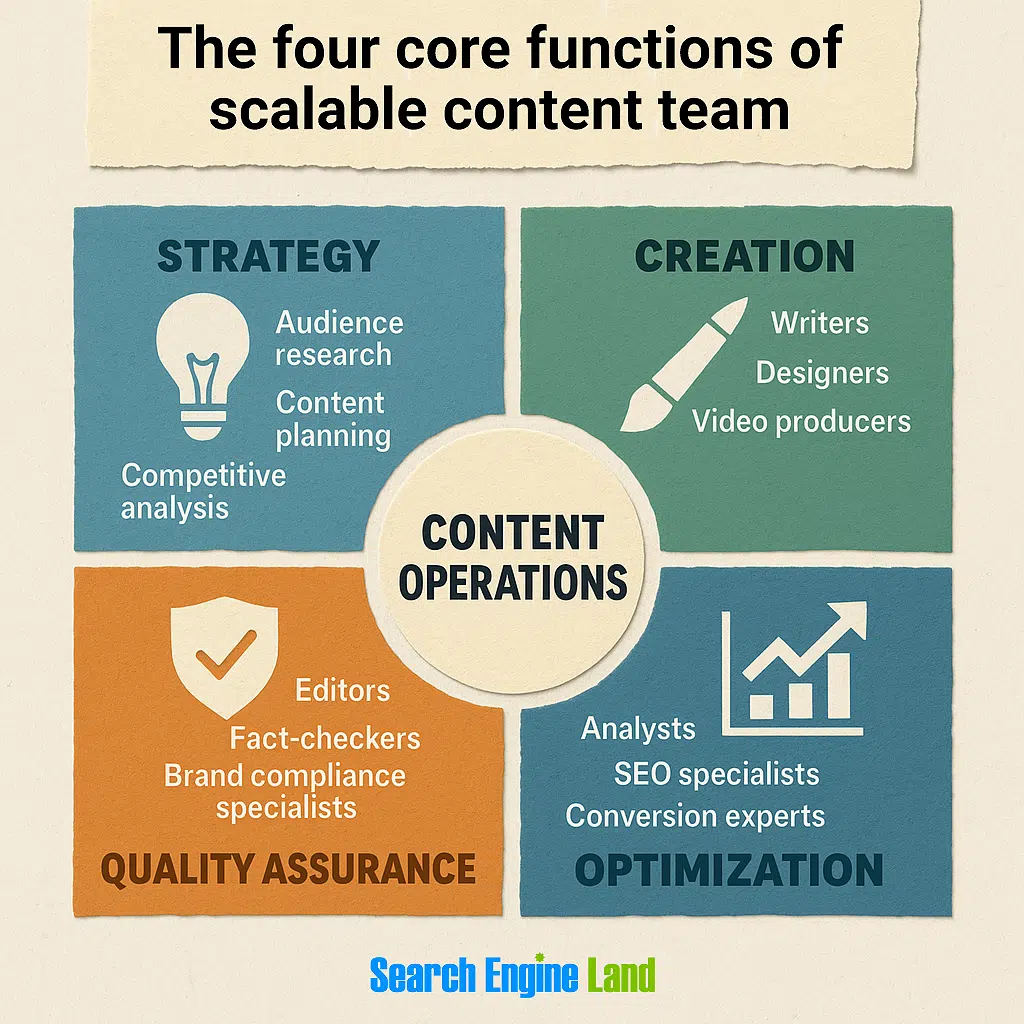
This represents the bare minimum human capital you need for a decent content scaling strategy that covers all types of content formats.
You can use AI-generated content, but it needs to be edited by a human. It’s best to use AI for supporting tasks such as title generation, outline creation, social content creation, etc. The core content body must be created by an expert.
Analyze and Tweak
Scaling content creation requires continuous monitoring. You need to make immediate changes to your strategy and workflow based on content performance.
There are two ways to analyze content scaling performance:
- Use metrics that correspond to your primary goal. For instance, if your goal for scaling content creation was to increase organic traffic 2x in 6 months, you need metrics like organic traffic and keyword ranking to track performance.
- Behavioral analysis or any form of qualitative performance shouldn’t be ignored. For instance, time spent on page, scroll depth, on-page CTR, bounce rate, etc. These metrics might not be related to your goal, but they have a huge impact on personalization and UX. And it eventually adds value to the bottom line.
Here are the major metrics you should track to measure content scaling performance:
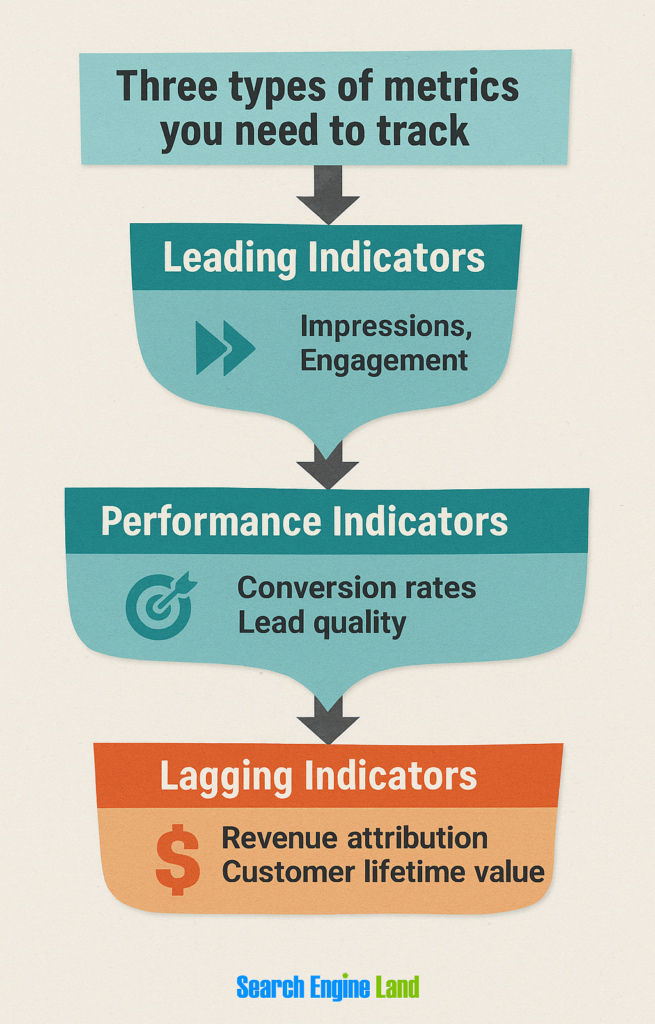
Tracking performance isn’t enough. You need to use this data to make appropriate changes to your scaling efforts.
Tweaking your content scaling strategy based on data is the best way to move forward.
Best Practices for Scaling Content Creation
Let’s jump to the best practices and proven techniques you should use to improve your business’s content scaling capacity and performance:
Create a Comprehensive Editorial Calendar
Content scaling is almost impossible without a detailed editorial calendar. It is a must-have.
It is a shared document that your content team uses for all task management and content scheduling and publishing. This is the document that gives a complete snapshot of your brand’s content.
You don’t just need a superficial editorial calendar for scaling content creation. It has to be very detailed.
The more detailed it is, the better.
Check out the following editorial calendar template in Notion. It is very detailed, user-friendly, and supports collaboration:

This type of editorial calendar is what you need when scaling content creation. Nothing ordinary or basic will work.
We already covered what it should have. Let’s jump to how to create one for your business that will work perfectly.
Ways to Create an Editorial Calendar
There are quite a few ways to create an editorial calendar:
- Create it manually from scratch in Google Sheets, Excel, or Google Calendar. This gives you more control and flexibility, but it has downsides. If you use Google Sheets or Excel, you get full control over it. You can add people, assign tasks, communicate, comment, and manage it the way you like. However, it gets challenging to manage all types of communication right on the sheet. Task assigning might be an issue, especially when you have to produce multiple content pieces per day.
- Use a template and create your calendar quickly. These templates use Google Calendar or Google Sheets. They still carry the same drawbacks as mentioned above, but they are much quicker to use and come with all the columns. You can get started immediately with a template.
- Use an app such as Notion, Trello, or Airtable that supports multiple features to create and manage editorial calendars. The template above by Notion provides you with all the features you need. It lets you assign tasks, add details, schedule content, collaborate, and do a lot of other stuff. There’s no need to use any other tool when you use Notion or Trello.
Ideally, you should use an app as it works best both in the short and long-run.
If you want to keep things simple, use Google Calendar or Sheets to get started.
But eventually, you’ll have to move to a dedicated tool.
Create a Style Guide
The editorial calendar works hand in hand with the brand style guide. It is an essential document to execute your content scaling strategy successfully.
A style guide is a formal, detailed document that lists all the dos and don’ts of your brand’s content creation. It has the guidelines for your brand’s entire content including typography, design, color scheme, formats, and more.
Here’s an example of a style guide:
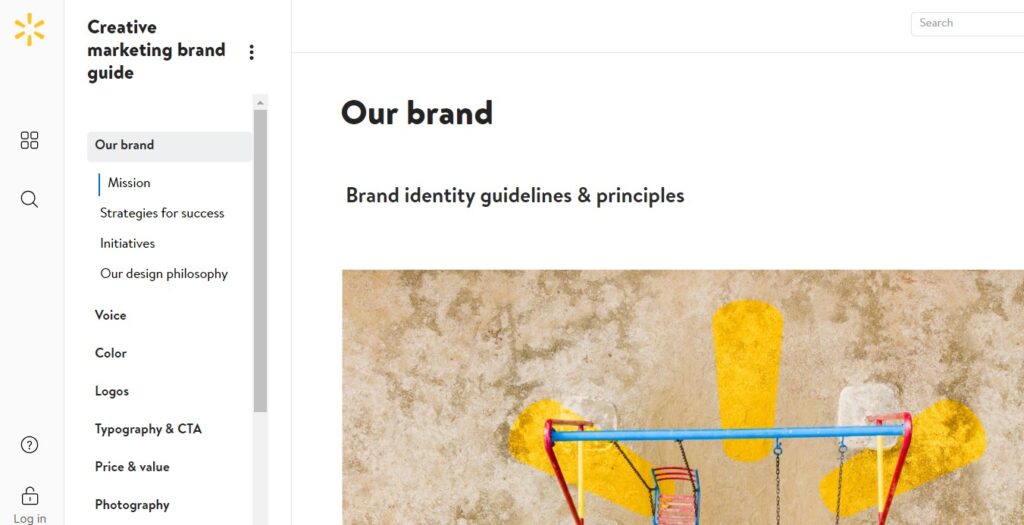
You can add a lot of details in your brand style guide related to content creation and scaling including SOPs. It is quite helpful for both your writing team and AI and helps maintain consistency for the entire content you generate.
Here’s what you achieve with a style guide when scaling content creation:
- Visual branding
- Consistent tone and voice
- Content themes
- Color palette
- Imagery and graphic consistency
- Content type, formats, and style.
It significantly increases productivity as everyone in your content team knows what to do and how to do it. This reduces revisions and errors. Your editing team can churn out more content fairly quickly when all the pieces align with your brand style guide.
You can create a brand style guide using a template. There are a lot of free templates available out there. Pick any and customize it.
Here’s what to include in the style guide along with best practices to ensure it works as expected:
- Make it very detailed
- Ensure that it’s easy-to-read, understand, and skim
- Add writing, formatting, and editing guidelines
- Add ready-to-use AI prompts for content creators
- List allowed color codes, typography, and other visual elements
- Allowed tones and voices for different platforms
- List of allowed apps and tools
- Logo usage guidelines.
Create Workflows
Scaling content creation is a lot of work. It isn’t just about publishing one new blog post every day. It covers social content, videos, images, slides, PDFs, and other forms of content that go across a wide range of channels.
This isn’t easy.
You need to be highly efficient at creating content regularly. This can be best done by developing automated workflows.
You need to break down content creation into microsteps. Try to automate most of these micro steps using AI and other tools. Your team should know what it has to do and how it is to be done with clear guidelines and instructions.
Here’s an example of such a workflow:
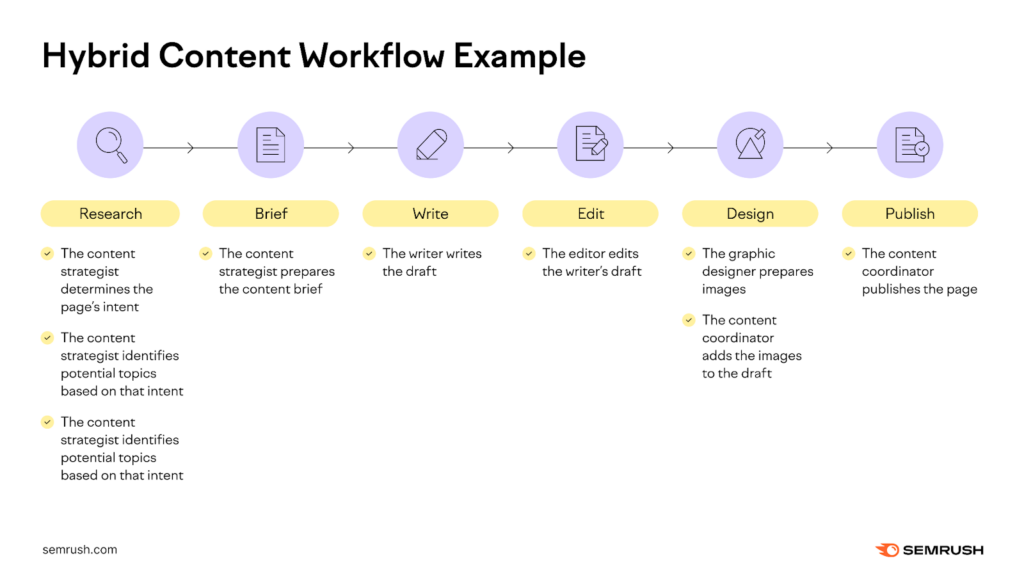
Research shows that using automated workflows for content creation (and scaling) saves 95% of time, reduces cost by 75%, and increases lead generation by 220%:
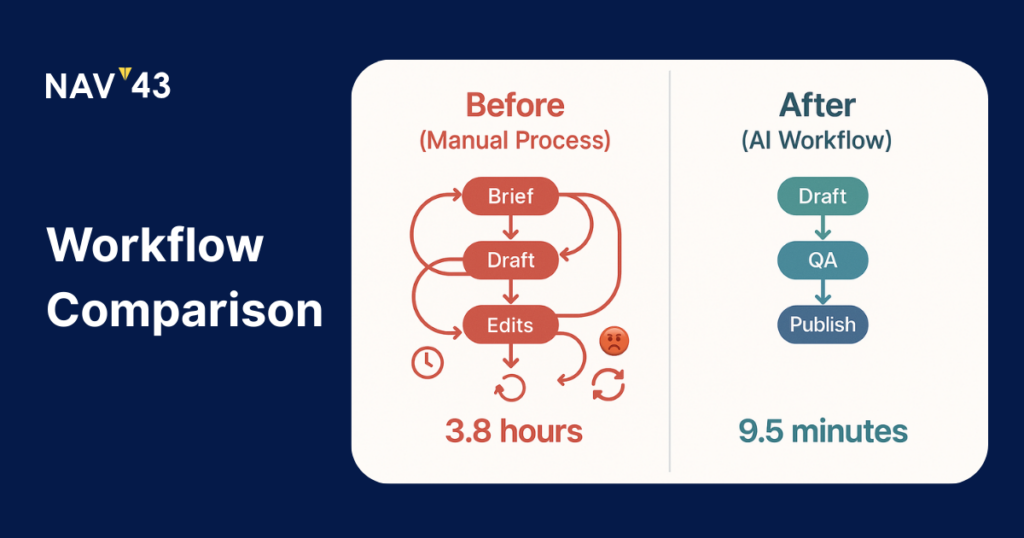
Here’s how to create workflows for your content scaling strategy which you can reuse easily:
- Identify core tasks/steps for the process. These include research, brief, writing, editing, design, publishing, analysis, updating, distribution, etc.
- Create micro tasks/steps for each of the core processes. For instance, content research might include a series of micro steps starting from the content goal to the identification of topics.
- Decide how each micro step is performed. It could either be automated using an AI tool or carried out by a human.
- Identify the optimal approach to completing a micro task. This includes creating exact steps and templates. This should also cover SOPs.
- Assign each micro task to an appropriate team member or an app.
You’ll need to use your tech stack here and try to automate most of these micro tasks.
Be Ready to Outsource
Don’t try to do it all yourself. You have to outsource a certain portion of both core and micro tasks. It gets pretty challenging to get decent output from content scaling without getting foreign help.
Up to 86% of businesses outsource content creation, 30% outsource content distribution, and 11% outsource editorial planning:
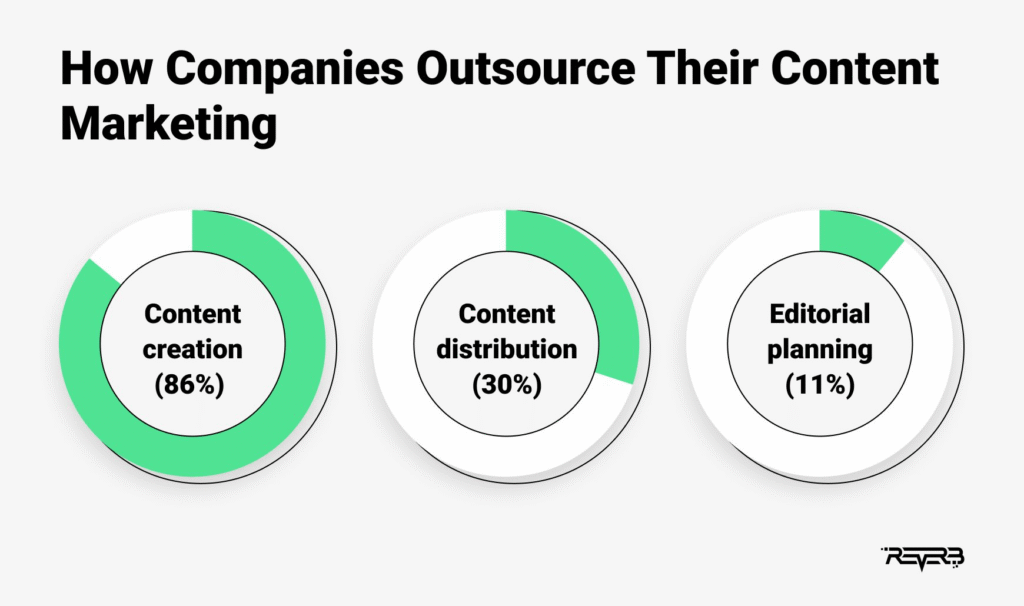
You can enjoy a lot of benefits by outsourcing parts of content scaling:
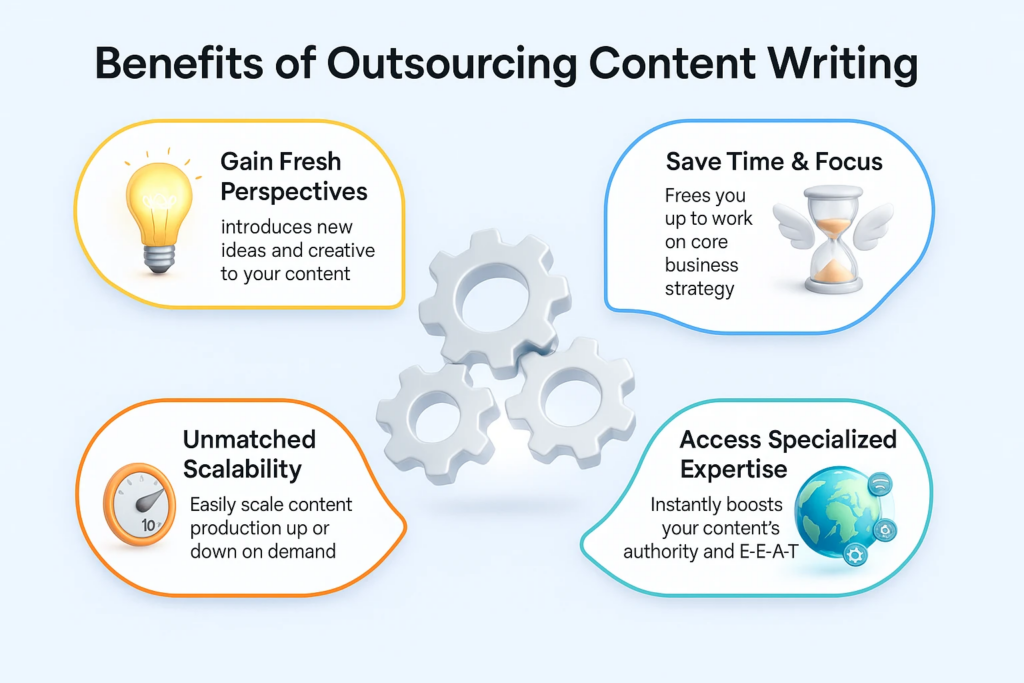
- Better use and allocation of available resources (e.g., human capital)
- Low cost with immediate output. You don’t have to spend resources on apps, workforce training, etc.
- Access to skills, experience, and expertise
- Get access to subject matter experts who help you meet E-E-A-T guidelines
- Boost productivity and efficiency of your content marketing team as they only have to focus on strategic, high-impact tasks (instead of non-tactical steps).
Outsourcing isn’t harmful if executed appropriately. It comes down to what tasks you are outsourcing.
It is best to outsource non-tactical tasks.
For instance, instead of outsourcing content scaling strategy development, outsource content creation, editing, and publication.
Manage strategy in-house.
There are different ways to outsourcing you can look into such as:
- Outsourcing to an agency
- Hiring freelancers or remote workers, either part-time or full-time.
Scaling content creation can’t be done all in-house. The sooner you understand it, the better.
Work on Team Collaboration
Communication across teams plays a central role in scaling content for your brand. It requires swift, seamless, and real-time collaboration between your content team and across different teams within and outside your company (in case of outsourcing).
Poor communication has a negative impact on the outcome of the project. As much as 97% of employees and leaders say that poor team alignment negatively impacts task outcome:
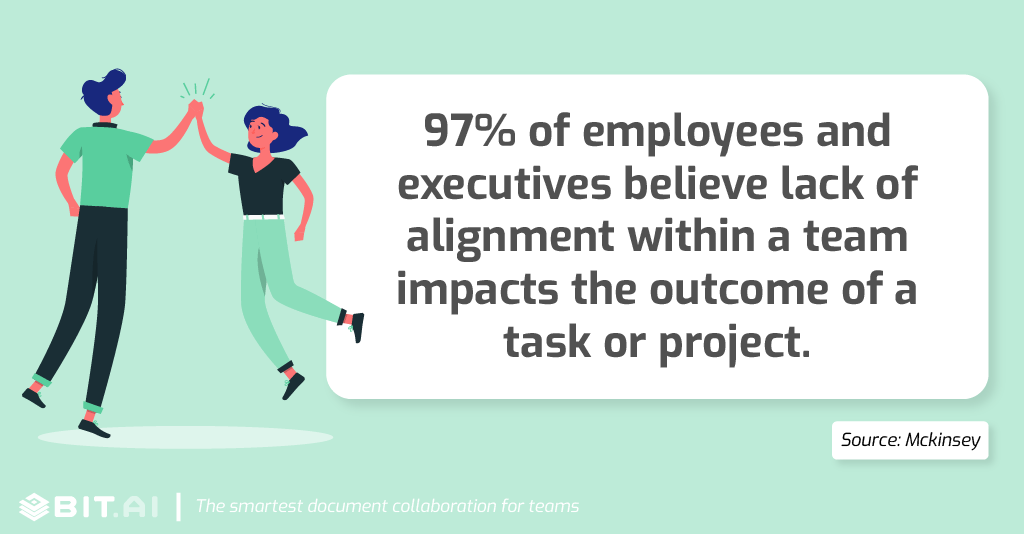
Collaboration also impacts productivity, profitability, and customer experience:
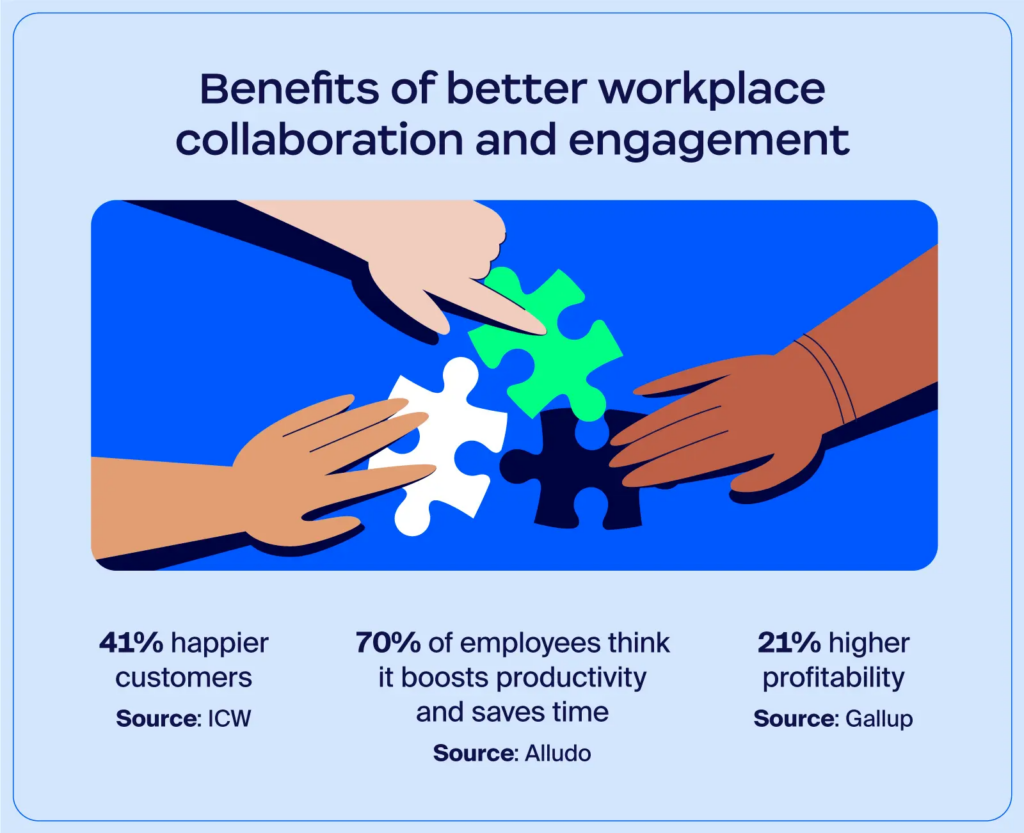
Since content scaling is a team work, you need to develop a culture of engagement and consistent communication throughout your business.
Here’s how to enforce collaboration for better content scaling:
- Use a project management platform to establish SSOT. Avoid using different channels and tools for communication, and stick with just one app across your business.
- Enforce integration of your primary communication app. It must be linked to your entire tech stack so everyone has access to it all the time.
- Develop communication, collaboration, and teamwork SOPs.
- Ensure cross-functional collaboration. Create SOPs for cross-team communication.
- Educate your workforce on the importance and effectiveness of communication.
- Tweak your organizational culture with support for collaboration across teams.
Here’s a list of the popular collaboration and project management tools you can choose from:
- Asana
- Slack
- Trello
- Figma
- Wrike
- Teamwork
- Basecamp
- Microsoft Teams.
You need to choose one app and stick with it. Don’t look at it from the perspective of scaling content alone, look for an all-purpose platform you can use throughout your organization.
If you are already using a collaboration and/or project management tool for your business, use that. Don’t use a different app for the content team.
Keep Content Scaling Simple
Don’t overcomplicate scaling content creation.
Yes, it sounds too much initially. And in some cases, it is complicated.
But your job is to keep it simple. That’s the whole point. If content scaling adds more manual work, you are doing something wrong. It has to work effectively and efficiently.
More content doesn’t mean low-quality content.
While you are putting in all the effort to automate and simplify content scaling, make sure content quality isn’t compromised. AI must be used smartly for repetitive tasks, not for content generation.
Scaling will only help if you focus on quality, people-first content. Otherwise, it is just a waste of resources.
Featured Image: Unsplash