Online ads is the most reliable traffic generation method for any business out there. As long as you don’t make PPC mistakes.
Paid traffic is instant, highly targeted, and scalable.
But you have to do it right to reap benefits. There are tons of PPC mistakes that silently drain your advertising budget in the background.
This actionable guide explores the top PPC mistakes that advertisers make along with the best techniques to overcome them.
Targeting Wrong Keywords
Perhaps the most lethal PPC mistakes that eat your advertising budget like crazy.
Google Ads is a bit tricky in terms of keyword targeting as it uses multiple keyword match types:
- Broad match
- Phrase match
- Exact match.
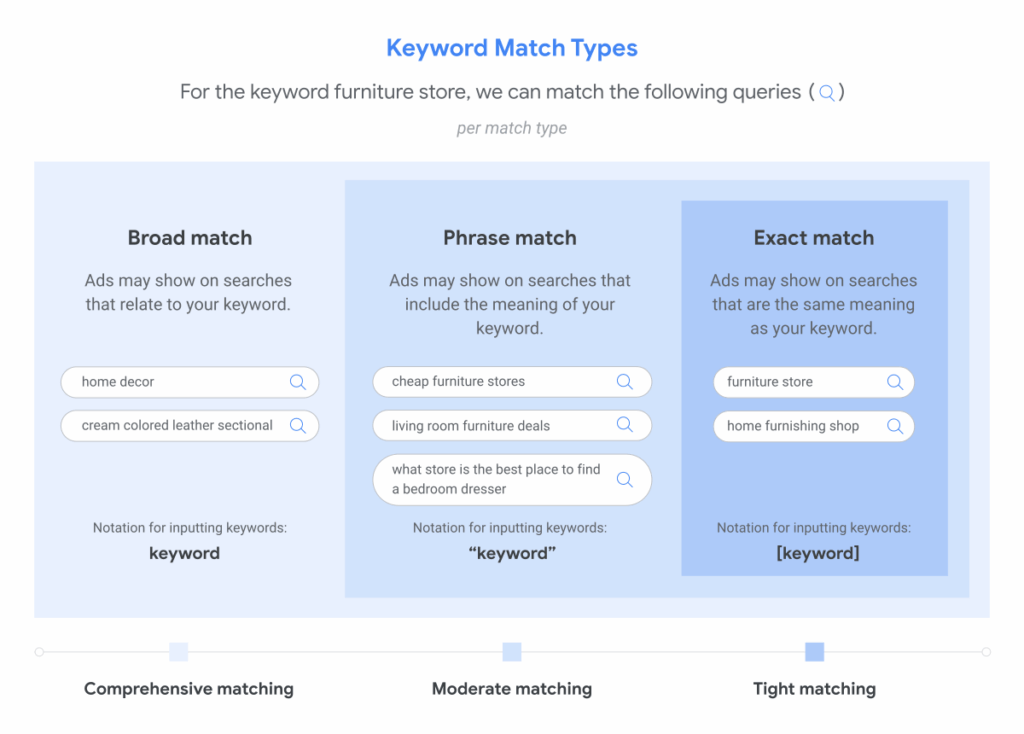
Broad match is quite comprehensive as it triggers your ads for keywords that are related to your keyword (but might be totally different). Here’s an example:
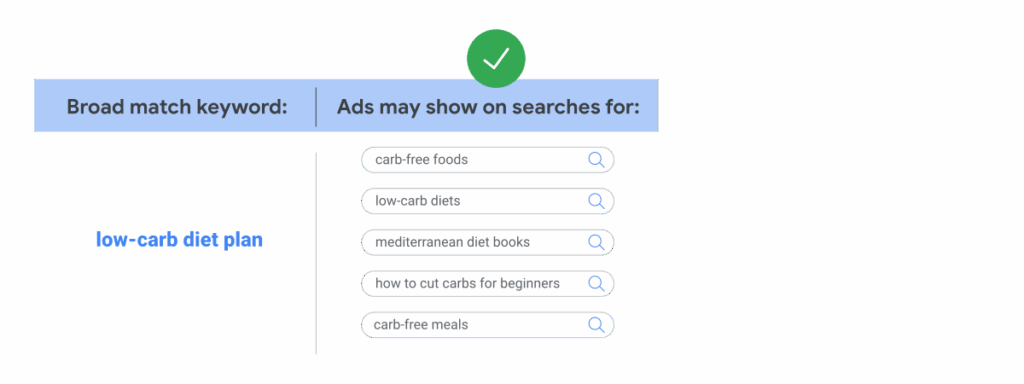
In this case, you are more likely to receive traffic from irrelevant keywords and this significantly increases the cost with a poor return.
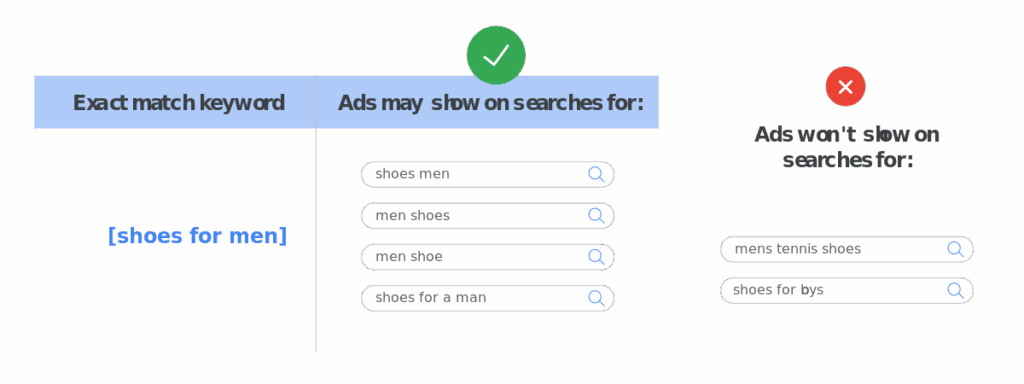
On the other extreme, an exact match shows your ad for exact keywords that have similar intent or meaning. It doesn’t account for any related keywords that don’t have the ‘exact’ word. This limits your reach, but it optimizes your ad budget.
Here’s an example of how an exact match keyword works:
Google Ads, by default, encourages you to switch to broad match type during campaign setup. As it increases reach and helps you generate more impressions and clicks.
And this is where most advertisers end up targeting the wrong keywords that are not even related to their landing page and offer. This has severe consequences as you exhaust your daily budget with poor conversions.
How to Fix this PPC Mistake
You need to use the exact match type to target the right keywords.
This is the best approach as it minimizes risk and helps you stick with existing, known keywords that you have.
However, exact match works when you have a detailed list of keywords and you have done your homework.
There are instances when you need phrase match and broad match:
- When you want to discover new keywords that your audience is actively using, but you aren’t targeting them
- To expand to new audiences and scale your campaigns
- When you don’t have enough keywords to begin with (due to a lack of keyword research).
Phrase and broad match help you verify your keyword research.
In the absence of a broad match, you’ll keep targeting a set of keywords, assuming that these are the only keywords your target audience uses. And this restricts scaling, reach, and growth.
Ideally, you should start with an exact match and then move on to phrase match and finally switch to broad match type to find new keywords.
What’s important is that you inspect keywords regularly and remove irrelevant keywords to avoid spending money on them.
And don’t forget negative keywords…
Not Using Negative Keywords
A negative keyword is any word or phrase that prevents your ads from triggering. These are used to stop spending the budget on irrelevant keywords.
Anyone who’s running a search campaign on an ad network like Google must use negative keywords irrespective of match type.
If you have set up an ad campaign without negative keywords or if you don’t update the negative keyword list regularly based on campaign performance, you are losing money.
Since negative keywords are tricky and are based on the keyword match type, most advertisers end up blocking positive keywords. This negatively impacts your campaigns.
So, there are two major types of negative keyword-related PPC mistakes that drain your budget:
- Not using negative keywords
- Poor management of the negative keyword list.
In both cases, your ads will show for irrelevant keywords leading to budget drainage with minimal ROAS. You may or may not have low CTR or impressions, but your conversion rate is likely to decline.
How to Fix this PPC Mistake
Use negative keywords.
And use it the right way.
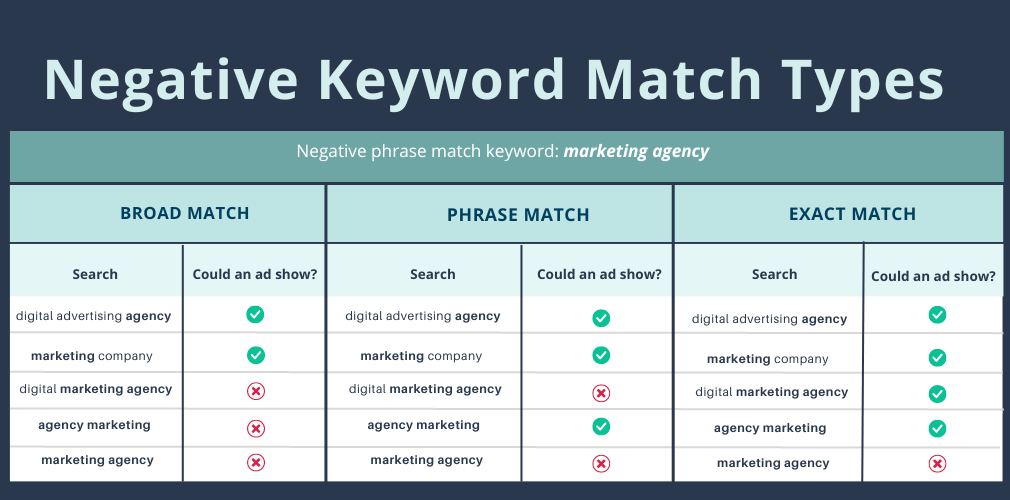
It’s important to fully understand how negative keywords work. You can add 3 negative match type keywords in Google Ads:
- Negative broad match: It is the default negative keyword setting in Google Ads. Your ads won’t show when all the words in the negative word are present in the search query in any order.
- Negative phrase match: The ads stop triggering for queries that have the exact phrase and all the words in the query in the same order. The ads won’t show when there are additional words in the query, but your full negative keyword.
- Negative exact match: The ads don’t show when the search query has the exact keyword in the same order and without any additional words.
Here’s an example of negative keyword match types:
Negative keywords can be added at the ad group level, campaign level, and account level.
Here’s how to get started with negative keywords:
- Create a list of existing negative keywords. You can derive this from keyword research. For instance, if you don’t offer anything free, “free” should be added as a negative broad match type so your ads don’t trigger for any search query that has the word ‘free’ in it.
- Monitor the search terms report in Google Ads after running ads for a few days. Identify irrelevant keywords and add them to the ad group or campaign level.
- Select the right match type.
- Google Ads allows the use of 4 symbols in negative keywords which include ampersands, accent marks, asterisks, and apostrophes. Use them smartly and carefully.
- Update the negative keyword list by adding new keywords regularly, preferably once a week.
- Create a negative keyword list for your account that can be applied instantly to all the campaigns. This will save you a lot of time.
Poor Targeting
You might have everything in place with the best ad copy, offer, landing page, and funnel, but it can fail miserably if you are targeting the wrong people.
Poor targeting is a silent killer for any PPC campaign. It wastes your budget and ruins metrics including ROAS.
There are different types of targeting mistakes that all lead to budget drainage:
- Targeting wrong or all broad keywords (discussed above)
- Ignoring search intent
- Buyer persona related issues such as not having them at all or targeting multiple personas in a single campaign (trying to reach a broader audience)
- Trying to achieve too much from a single ad campaign
- Ignoring data.
Paid ad targeting is a very broad area. It covers numerous variables and factors that are directly or indirectly related to targeting. You can miss a single one and it might backfire.
The important step is identifying if you are losing budget due to poor targeting. You can do this by looking at PPC metrics:
- Low quality score
- Poor conversion rate with funnel leakages
- Too many ad impressions, but significantly low clicks
- CPC is too high (higher than average).
If you are running one or a few campaigns, it’ll get really hard to identify targeting issues. You need a benchmark to compare metrics and if all the campaigns are performing poorly, you won’t have a benchmark.
You can use PPC benchmark reports such as this to get an idea of where you stand. If the deviation is too high, you have a problem that needs to be fixed.
How to Fix this PPC Mistake
Once you have identified an issue with PPC targeting, there are a few proven steps you can take to fix the issue.
These include:
- Improve keyword targeting. Stick with exact match and use long-tail keywords. Use keyword data from Google Analytics and Search Console for a PPC campaign
- Stick with one buyer persona per campaign or ad group. Don’t target multiple personas through a single campaign
- Segment your audience on Google Ads
- Target the right funnel stage by matching search intent with the funnel stage
- Make sure demographic targeting is set correctly. Using Google’s default targeting settings isn’t usually the best idea and it mostly brings in irrelevant traffic. Choose your targeting smartly
- Look at ad reports and tweak targeting settings as needed
- Understand the difference between people who have interest in your targeted locations vs. people in your targeted locations in Google Ads
- Adjust ad frequency, rotation, and timing for better targeting.
Most of the targeting issues can be fixed during the campaign setup process.
A common example is location targeting, where Google recommends showing ads to people who have an interest in your target location but might not necessarily be located in that location. This might be good for some businesses, but in most cases, it doesn’t work.
Such as in the case of a retail store. You don’t want to show ads to people who are not in your target location.
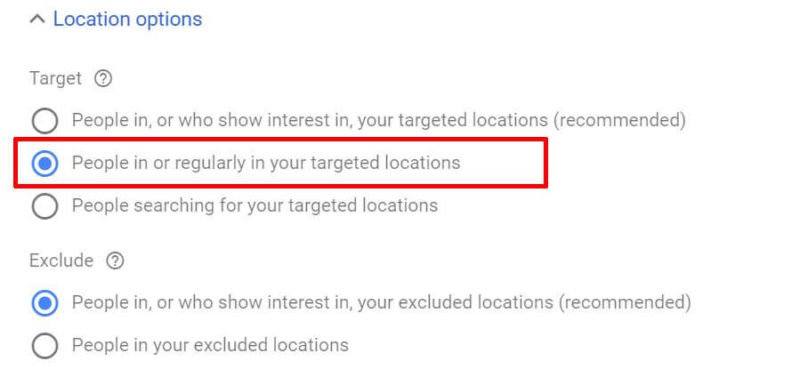
Most advertisers don’t use the exclude feature either, fearing that it will reduce the reach of their ad (which Google and other PPC networks warn you of when you narrow down targeting).
You need to be sure of what you are doing and stick with precise targeting despite recommendations and/or warnings. That’s the only way to improve ad targeting and avoid wasting budget on irrelevant traffic.
Flawed Ad Copy
This is very common. Especially after the AI.
A poor and/or flawed ad copy won’t work. Period.
Research shows that up to 45% of ad campaigns fail due to poor creative quality. And it’s not just limited to poor grammar, image selection, or typos.
It can take any form. Sometimes, pun can go wrong:

They had to tell where to wear glasses.
Ad copy mistakes can take any form:
- Poor creative selection
- Excessive use of AI in writing copy
- Spelling and grammar mistakes
- Vague and ambiguous copy
- Offering too much in a few lines
- Focusing too much on features
- Technical issues, such as no audio in a video ad
- Misleading information and deceptive practices.
Google removed 146.9 million ads in 2024 due to misrepresentation, which is a form of poor ad copy that is deceptive in nature:

Poor ad copy isn’t something that will only cost your budget to be drained, it can lead to other serious issues.
How to Fix this PPC Mistake
There are tons of actionable steps you can take to improve ad copy and make it work in your favor.
It’s important to understand the parts of an ad copy so you can optimize each one.
Let’s take an example from a text ad from Google Ads:
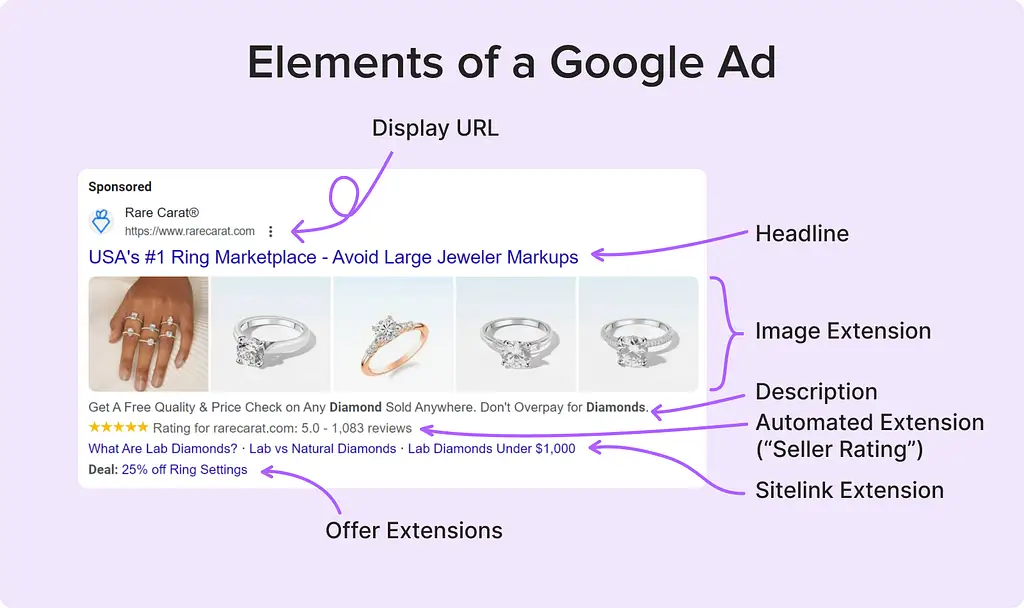
It has:
- A headline
- Description
- Image(s)
- Display URL
- Ad extensions.
You have to add a copy for the headline, description, and some types of extensions.
The same goes for other ad networks including social platforms, where you are required to add a headline and description (and images or videos).
Now let’s see how to refine and improve the headline and description of your ad copy and make them both flawless:
- Highlight product benefits, not its features
- Define your unique selling proposition and use it in copy
- Avoid grammar, spelling, and other types of errors in content
- Avoid using jargon
- Focus on clarity and relevance with the landing page and offer (more on this below)
- Avoid deceptive practices, rather, stick with facts and actual details
- Add power words in the headline to grab attention
- Leverage dynamic content to match user’s search query
- Create an emotional connection with your audience
- Add CTA in description.
There’s no room for making mistakes in ad copy. Make sure you have an editor who approves ads before they go live. This gets important when you have hundreds of campaigns running simultaneously.
Landing Page and Ad Mismatch
Does your ad lead to the right landing page that has the exact same offer you promoted in the ad?
It should.
Here’s what a mismatch between ad copy and landing page looks like:
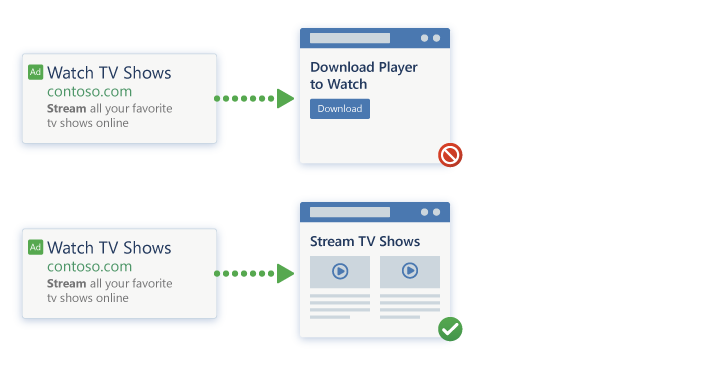
Your ad presells an offer and the landing page should pitch the same.
Advertisers often end up creating ads that deviate from the landing page and corresponding offer (either intentionally or unintentionally). This leads to high impressions, clicks, and CTR but low conversions.
In most cases, the ad doesn’t deviate too much rather slightly. But it creates a barrier.
Your job is to reduce friction, not to add it.
For instance, you promote how to lose weight in the ad. The destination should offer weight loss tips. It shouldn’t offer a paid weight loss program, an intermediary page, weight loss recipes, or anything else:

A slight change in the offer can prove to be suicidal.
How to Fix this PPC Mistake
The ad must be a true representation of the landing page and offer. Nothing more, nothing less.
Your ad should presell the offer without any hype.
Consider an ad as a promise that you make with the audience. The landing page is where you fulfill your promise. You need to make sure you exceed expectations by offering something more only after fulfilling your core promise.
Don’t try to overdo it.
Follow these best practices to avoid this mismatch between ad and landing page:
- Ad copy must be relevant to the landing page and offer
- Avoid using doorway pages, popups, or any type of cloaking
- The display URL must match the landing page URL
- Do not use redirects as they negatively impact conversions and UX
- The landing page must offer the promised product or content above the fold (not even at the middle of the page)
- The landing page should have one and only one offer. Don’t add multiple products or offers on the landing page.
Consider this:
An ad is a form of interaction with a potential customer. The landing page should continue the same conversation – not something else.
That’s how your ad will be aligned perfectly with the landing page and corresponding offer.
Poor or No Landing Page
Alignment between ad copy and landing page determines if a user will stay or leave.
The layout, UX, and design of the landing page determine if those visitors will convert and take the action.
However, research shows that more than half of the businesses don’t use a landing page for PPC at all.
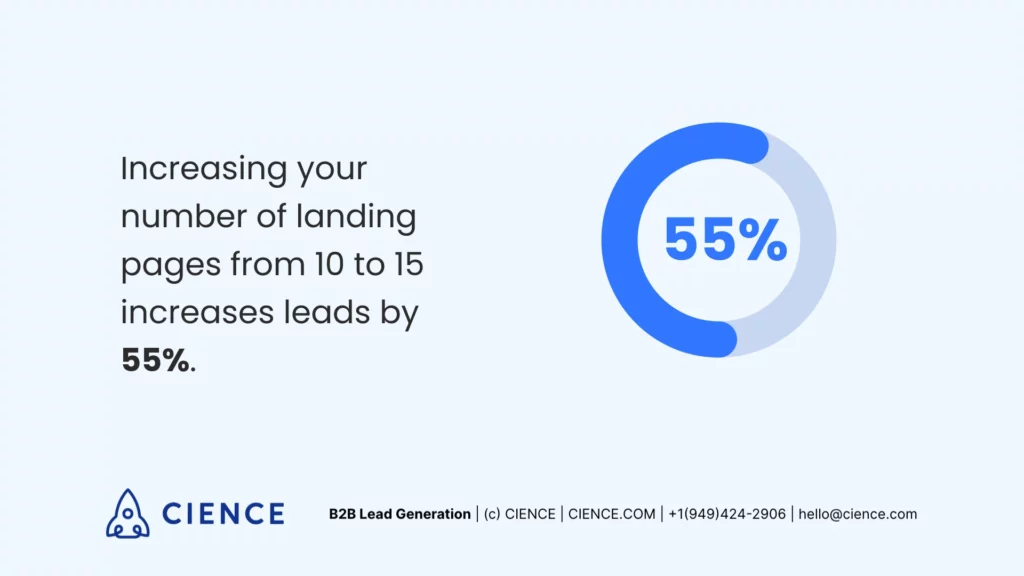
Research shows that using multiple landing pages significantly increases conversion rate. Increasing the number of landing pages from 10 to 15 increases the conversion rate up to 55%:
Yet, 52% of B2B PPC advertisers don’t use any landing page at all and they send traffic to the homepage. Another study reported that 68% of PPC campaigns send traffic to homepages.
Those who use landing pages don’t use them to their full potential.
A poor landing page (in any way) can ruin everything and might push interested users away forever. Importantly, a landing page has a direct impact on ad quality score, so it shouldn’t be ignored.
Common landing page related mistakes that advertisers make include:
- Absence of a dedicated landing page
- Poor headline
- Not using above the fold area smartly
- Multiple CTAs on the landing page
- Poor design and UX
- Slow load speed
- Ambiguous and unclear content, description, and value proposition
- Unoptimized form for lead generation
- Not creating and testing multiple landing pages.
How to Fix this PPC Mistake
The first step is understanding the importance of having a landing page for a PPC campaign.
You need to use a dedicated landing page, which shouldn’t be the homepage of your site. Ideally, you should use multiple landing pages for a single ad to figure out what works best.
The more landing pages you use, the better it is for conversions.
The reason why a landing page works better than a homepage is that:
- It is designed in relevance to the ad
- It is a purpose-driven marketing page that one CTA only with minimal distractions
- A landing page is consistent with the ad and continues the conversation (homepage doesn’t).
Once you decide to go with a landing page, you need to make sure it is fully optimized and well-crafted.
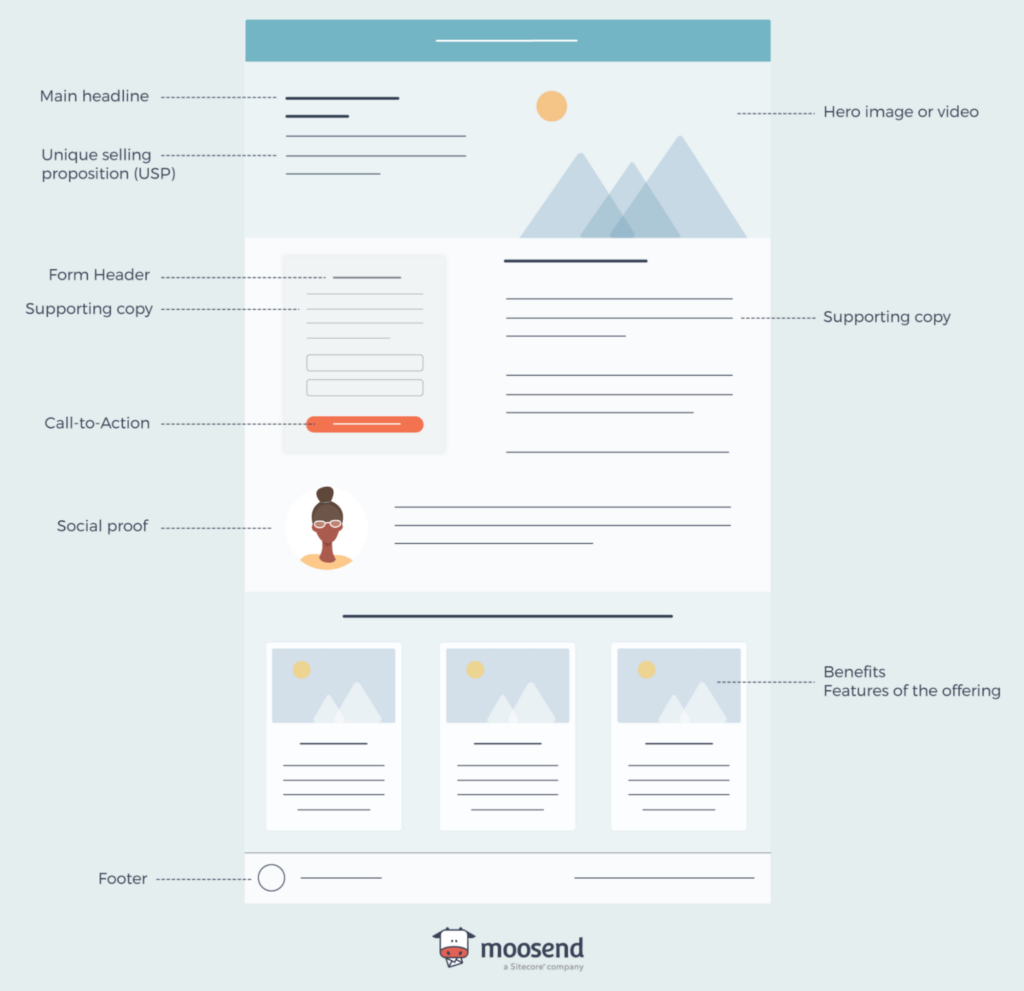
The essential elements of a landing page are:
- Headline
- Unique selling proposition
- An image or a video
- Copy
- Form
- Benefits
- Social proof
- CTA.
Here’s a structure of a high-converting landing page:
Follow these guidelines to ensure your landing page does its job effectively:
- The headline, copy, offer, CTA, and everything else on the landing page should be consistent with the ad
- Improve landing page load speed. Improve its Core Web Vitals using these techniques
- Use a video on the landing page as it increases conversion rate by 38.6%
- Stick with a single goal per landing page
- Don’t sell anything on the landing page rather, use it to generate leads
- Use one CTA per landing page and make it prominent
- Add CTA above the fold
- Optimize your landing page for mobile devices
- Remove clutter and distractions
- Add white space to improve readability and comprehension
- Minimize the number of form fields. It’s best to ask for the email address only
- Add social proof to boost conversions.
Improper Campaign Budget Settings
This often goes unnoticed.
But budget setting when creating a new campaign plays a major role in how your budget is utilized.
Setting a fixed budget per day is easy.
However, you need to update campaign start and end dates and also set ad schedules for most ad types.
If your campaign has no end date, it will run indefinitely. It gets problematic when you have a hefty budget and are running numerous ad campaigns across ad networks.
The ad schedule is a handy feature in Google Ads for retail stores, local businesses, and any type of business that has fixed working hours (which almost all businesses have, except ecommerce stores). Yet, the majority of advertisers don’t use ad schedule.
For instance, you are running a local ad campaign to drive walk-in customers to your physical store. You don’t want to show ads to potential customers when your store is closed. It’s money as well as customers lost.
This goes for all businesses that don’t attend to customers (including online businesses like service providers).
How to Fix this PPC Mistake
Start by setting an accurate campaign budget.
Understand how Google spends your daily budget. You don’t get exact spending per day and Google might increase or decrease your daily budget based on several factors.
Here’s what spending looks like as per Google:
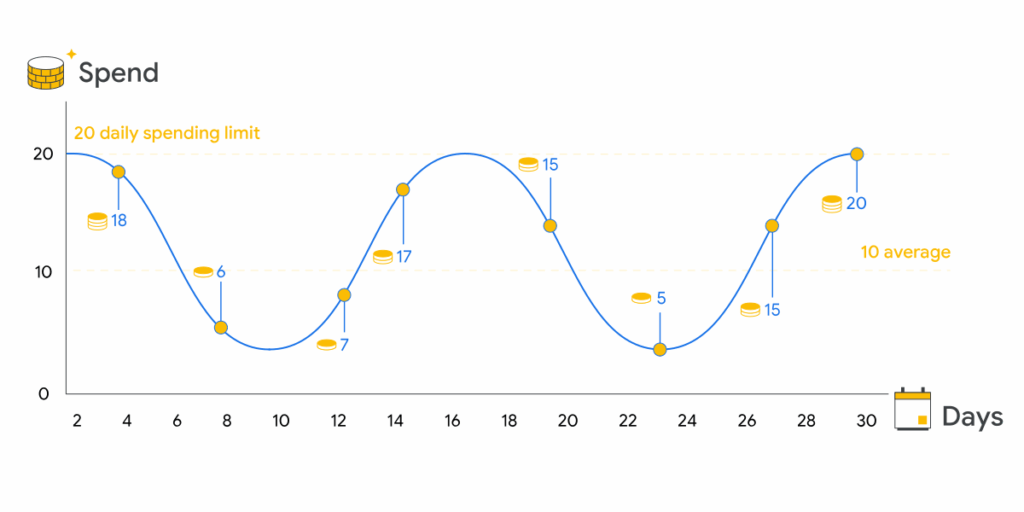
It’s not a straight line.
This might not impact your business and PPC budget significantly when you have a small daily spending limit. But if it is a few thousand dollars, this can accumulate too quickly.
You should keep an eye on it.
One way to limit overspending is to set an end date for your campaigns. This should be your standard procedure when creating a new campaign. In the absence of having an end date, the only way to stop a campaign is to pause it.
If you forget to pause a campaign, it will keep consuming the budget.
And don’t miss ad scheduling.
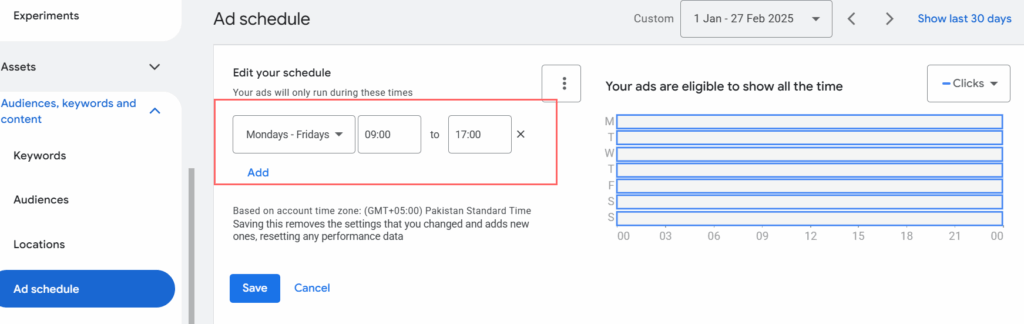
You can use this feature to run ads for specific time slots per day and you can change bids on specific time durations. This should be used when:
- Your business remains closed to customers for certain times
- You don’t work on weekends
- You run local ad campaigns
- Your business isn’t ready to take new customers
- You want to reach your audience on specific days and time stamps (based on conversion data or business requirements).
It’s a good idea to set up custom notifications for Google Ads to get timely alerts for overspending.
Final Words
Protecting your PPC campaigns from issues gets challenging as you scale your business and switch from a few campaigns to hundreds.
It’s not easy to manage hundreds of campaigns across ad networks. Your ads then become prone to mistakes.
The best way is to periodically audit your ads and campaigns. Monitor data and check reports regularly.
This will help identify PPC mistakes and save your business from draining its budget on unwanted clicks and traffic.
Featured Image: Pexels