Email marketing has one of the highest ROIs across all online marketing channels. But it only works when you have a decent email open rate.
ROI depends on email opens.
You want recipients to open emails and take the required (conversion) action to make your email campaigns successful and profitable.
A consistent low email open rate across all campaigns is a big red flag. It indicates an underlying issue(s).
Let’s explore the top reasons for a low email open rate and how to overcome each one professionally.
Email Open Rate Definition
Email open rate is defined as the percentage of subscribers who open an email out of all the emails delivered to all the subscribers for a specific email campaign.
It measures engagement as a high open rate means a good chunk of subscribers opened your email (instead of ignoring it or deleting it without opening it).

It helps email marketers understand email performance and engagement. Email open rate is best understood when used with other metrics such as bounce rate, CTR, and conversion rate.
For instance, an email campaign with a high open rate a low bounce rate and a high CTR but with an exceptionally low conversion rate means the email itself is doing well, but the corresponding offer isn’t converting.
Similarly, a high open rate with a high bounce rate indicates an issue with email content that’s failing to hook subscribers.
But of course, the first step towards email marketing success is email open rate. You want subscribers to open the email so they can read and take action.
The success of an email campaign entirely depends on its open rate.
If it doesn’t get opened, it doesn’t matter how great the email body and the offer are. It has failed.
This is a reason why email open rate is one of the most crucial success metrics.
Email Open Rate Benchmarks
Email open rate is a percentage that doesn’t tell you a lot about your campaigns. It’s hard to decide if an email open rate of 12% is good, average, or poor.
The best way to figure out the optimal email open rate is to compare it with the same businesses in your industry. You should use email open rate benchmarks to figure out where you stand. These are industry averages that help you compare your email open rate against others in your sector.
You’ll find a lot of benchmarks for email open rates out there. You can look at a few to get an idea of where you stand overall and in your industry and region. Most of these benchmarks are published by email marketing companies since they have a lot of data (via their customers), so they are in a good position to publish benchmarks.
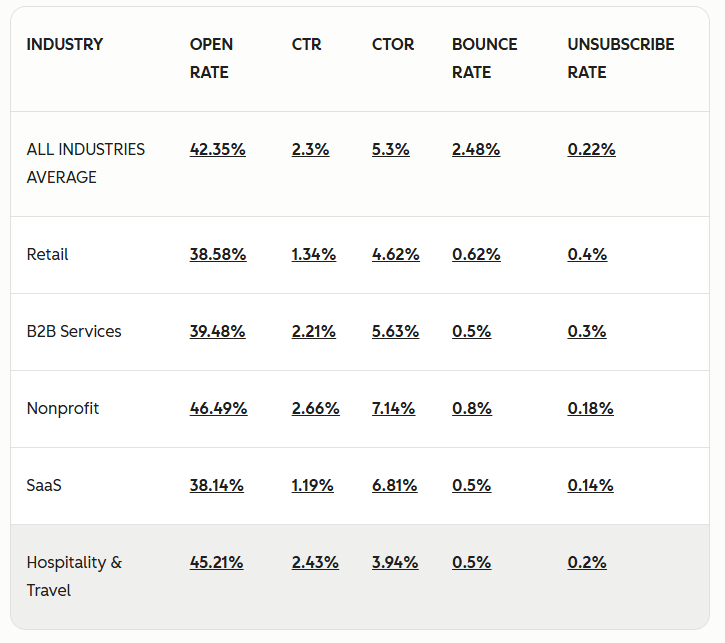
Here’s an example of email marketing benchmarks by HubSpot, which reported an overall email open rate of 42.35% for all industries:
Mailerlite reported a 43.46% open rate for all industries in 2025 with the highest email open rate of 55.71% for the religion industry:

Email open rates vary greatly across industries as it can be seen in this, this, and this benchmarks.
The first step is checking the average email open rate for your industry in 3-5 benchmarks. You can find those easily with a simple search.
If you are doing well, great.
If you are below average, you need to work on improving your email open rates.
Generally, you should aim for an email open rate of 30% or higher. If it’s lower, you need to work on it. And if it’s below 20%, you have some serious issues that need immediate attention.
Top Reasons for Low Email Open Rate (With Remedies)
Poor email open rate hurts your entire email marketing campaign. No matter how great email copy is, how attractive your offer is, and how persuasive your CTA is, it’s all meaningless if your email isn’t opened (by as many subscribers as expected).
The good news is that fixing low email open rates isn’t a big deal as it involves looking at a few critical variables that directly impact open rates.
The reasons with their remedies are discussed below:
Unknown Sender Name
A common mistake that directly impacts email open rate is when you use an unknown email sender name for your campaign.
Here’s an example of what your subscribers see in their inbox:

Here’s how emails look when they don’t have a sender name:
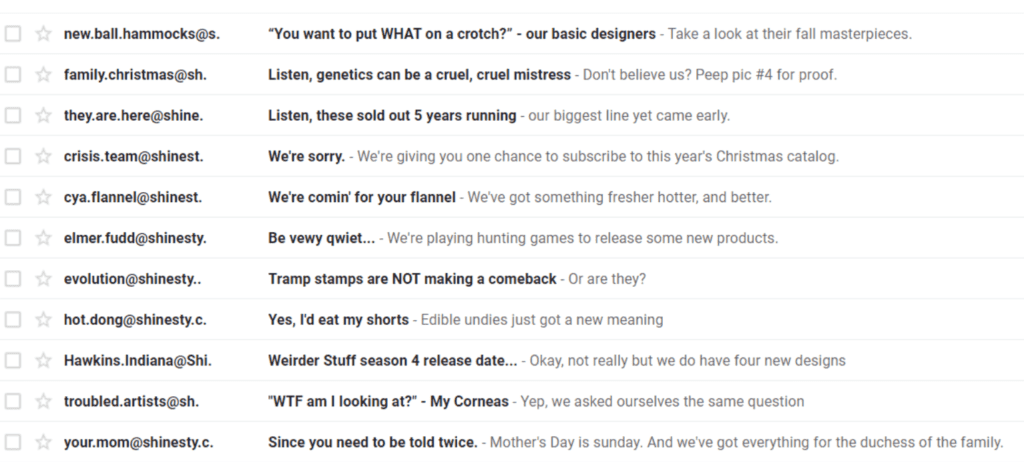
This obviously doesn’t look reader-friendly. Subscribers don’t know who this email is from and should they ignore it or open it.
This is a reason, emails that don’t have names are least likely to be opened. Research shows that 46% of people use sender names to decide if they should open an email.
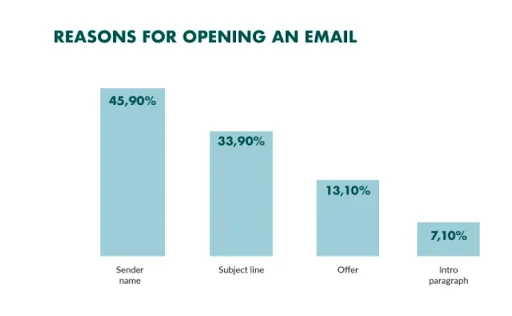
Having a sender name in email campaigns significantly improves customer trust and credibility. You and your business appear legit. Additionally, a sender name improves brand awareness and brand recall.
The two common types of mistakes that businesses make with respect to sender name are:
- No use of sender name
- Using an unknown sender name.
Using a sender name isn’t enough, rather, you should use a known sender name. It should be one that your subscribers are aware of.
How to Fix It
If you don’t want your emails to be ignored just because of the sender’s name, start using one.
Here are the best practices you should follow religiously for the email sender name:
- Use a name your subscribers are familiar with. This is normally the name you used to sign them up. This helps them recognize you and open your email because they already granted you permission for emails.
- Your business name is the best option as an email sender name. This is what your subscribers are familiar with. If you use different trade names or have multiple brands, it’s best to use the most popular name.
- Another way is to use the “first name at/from company” format. This is suitable for large companies where emails are sent out from different individuals across departments. It gives your email campaign a personal touch as people, in general, prefer communicating with people as opposed to businesses.
- You can use your full name to be more personal and build strong individual connections with your list.
- Be consistent. Don’t change the email sender name unnecessarily. Choose smartly and then stick with it.
Alien Email Address
The email address you use for email campaigns also impacts open rate. Using an unknown, generic, or spammy-looking email address negatively impacts email open rate.
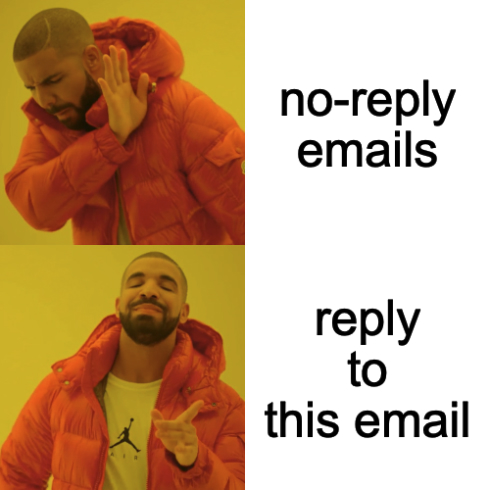
For instance, using a no-reply email address or using your Gmail or MSN email address to send email campaigns is the best way to get a low open rate.
Similarly, if your domain is abc.com and that’s what your subscribers are familiar with. But if you use an email address from a domain name xyz.com, most subscribers will mark it spam, while others won’t open it at all.
Even if you own another domain or it’s a sister company or a subsidiary, it’s not a good idea to use any other domain name except the one your list knows and has agreed to receive emails from.
Here’s a list of the common errors and issues that most email marketers make when choosing an email address for their campaigns and end up ruining open rate:
- Using an unfamiliar email address on the same domain
- Relying on a no-reply email address which might be a good idea for transactional emails where a reply is not needed. It backfires for newsletters and marketing emails as it blocks two-way communication
- Not using an email address on your primary domain name.
How to Avoid It
Selecting the right email address for email campaigns is a crucial and technical step.
Here’s how to make sure your email address doesn’t restrict your list from opening emails:
- Don’t use a free email address (e.g., Gmail). It doesn’t just ruin credibility, but it also hurts email open rate
- Use a branded domain (the one your list subscribed to) to create an email address they know
- It is best to use a subdomain to protect your primary domain. This is a must for businesses that have to send hundreds of emails on a daily basis. If you have a small list, you can go with your primary domain
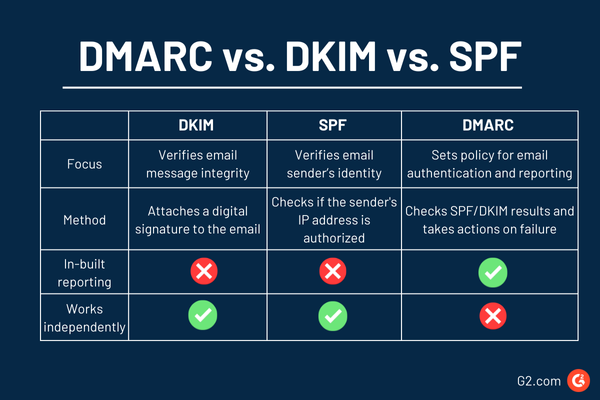
- Authenticate your email address and domain name using DKIM, SPF, and DMARC. These authentication protocols ensure that emails from your domain name and your domain name are marked safe (instead of spam). When using your domain to send emails, authentication is a must, else your emails will never reach subscribers’ inboxes
- Be consistent. Avoid changing sender email address unnecessarily.
Remember, your list only knows you from your email address and domain name. Don’t try to approach them as a stranger (that’s what you do when you use random, unknown email addresses).
Poor Subject Line
This is where the magic happens. The email subject is the most important variable that predicts open rate.
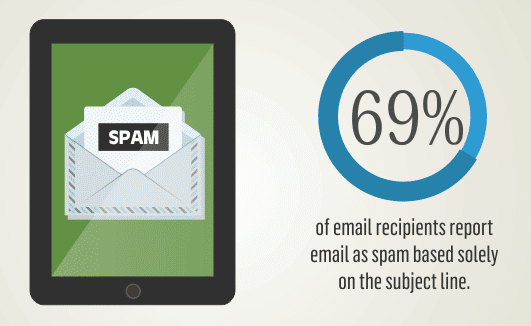
Research shows that 47% of people open emails based on the subject line and 69% of them mark emails spam based entirely on the subject.
There’s a reason for it…
The email subject is the only way an email recipient can get to know if it’s worth the time to open and read it. There’s no other way.
It’s your best shot to persuade recipients to open your email.
A poor, unoptimized, and generic subject line will push your email towards the trash in no time. If you are struggling with email open rate, the first thing you should tweak is the subject line.
In most cases, it works.
Sender name and email address are still important, but they play a secondary role in open rate. The subject is directly associated with the open rate.
How to Optimize Email Subject Line
So, how do you write better, persuasive email subject lines that force recipients to open your emails?
There’s a lot you can do.
But let’s start from the basics of the subject line:

- The optimal length of the email subject line is 6-10 words. Emails having 6-10 words in the subject line have the highest email open rate (up to 21%).
- Adding a recipient’s name in the subject line has an 18.30% open rate as opposed to 15.70% for emails that don’t have the recipient’s name in the subject.
- Personalized subject lines have a 22.2% higher open rate than their counterparts.
Besides these basics, there are certain words that, when added to the subjects, have a huge impact on open rates. Here’s a list of the words you should (and should not) add in subject lines:
- Adding “free” in the subject line increases email open rate by 10%.
- “Video” in the email subject line increases open rate by 7-13%.
- Email subject lines having digits see 57% higher open rates than emails that don’t.
- Adding an emoji in the subject line increases open rate by 56%.
- Sense of urgency, FOMO, and exclusivity in the subject line increase email open rate by 22%.
- Emotional subject lines are 94% more effective in terms of open rate than rational subject lines.
- Email subject lines optimized by AI have 5-10% higher open rates than human-optimized subject lines.
- Emails with no subject line have 8% higher open rate than emails with subject lines.
- The word “newsletter” in the subject line decreases email open rate by 18.7%.
- Using “fw:” in the subject decreases email open rates by 17%.
It’s important to test subject lines religiously. You never know what you are missing until you test it. There’s a reason 40% of global email marketers A/B test subject lines.
Poor Preheader Text
Preheader text or preview text is what email recipients look at along with the subject line. It is not part of the email subject line, rather, a different section of the email.
But it plays a huge role in email open rate.
As much as 24% of subscribers decide to open an email based on its preheader text. It influences 7% of open rates and emails with a preheader have 109% higher open rate than emails without a preview text:

A preheader text, if you are unaware of it, is a short text that appears next to or below the email subject line. It is an extension of the subject line and helps you give a brief overview of the email content or purpose to the recipients:
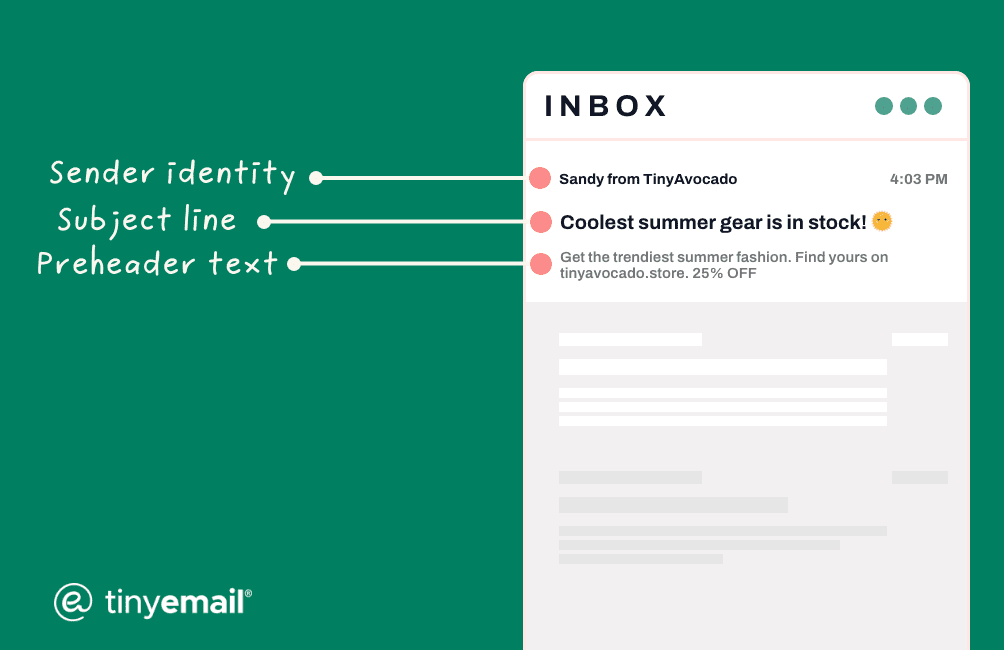
The purpose of the preheader text is to give an overview of the email’s content to the recipients. It can be an extension of the subject line or an entirely standalone piece depending on how you use it.
In any case, it’s an important element that shouldn’t be overlooked.
Not having a preheader text or not optimizing it has a negative impact on open rate and UX.
How to Optimize Preheader Text
You need to start with the right length.
There’s no standard optimal preheader text length. It’s because the actual preview text shown to the recipient depends on the service provider, device, and inbox settings.
The first 50 characters of the preheader text are what’s important. You can go up to 80-100 characters, but the first 50 characters should convey the message.
This is because the initial 50 characters will appear on all devices including small screens like smartphones. It’s best to ensure your message is conveyed promptly in the first 50 characters and it must be complete.
You can add additional details (secondary information) in the next 50 characters if you want (for large screens).
The next step is finalizing preheader content. This is more important than the length.
Here are the best practices you should stick with when crafting preview text for emails that’ll help you boost email open rate:
- The best types of preheaders are the ones that align with the subject line. It should not merely repeat the subject line but provide more insights to recipients with a focus on why they should open the email
- Use it to give a quick overview of the email content. You can highlight key benefits or the purpose of the email in the preheader text
- Add an incentive in the preview text for subscribers to open your email. Or, tell them what monetary incentive they’ll get once they open the email
- A call to action is a must-have part of preheader text. Add a clear, persuasive CTA in the preview text
- The preheader text should be personalized. The best way is to add the recipient’s name or refer to the most recent interaction they have had with your brand. This is a great way to increase open rate
- Adding an emoji makes your email stand out from the crowd in the inbox which is a decent way to get attention.
Here’s an example of a perfectly written preheader text:
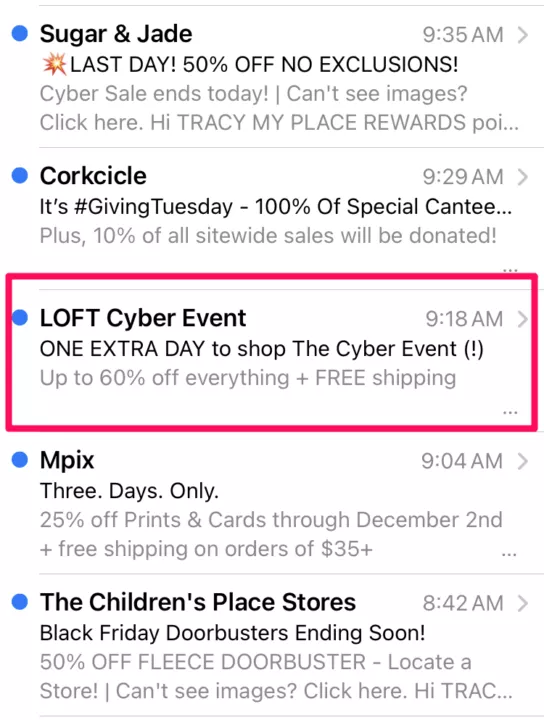
It summarizes email content coupled with an incentive. Recipients who need a discount can’t resist opening such an email.
Lack of Personalization
Poor or no personalization for pre-open elements of an email campaign leads to a low open rate.
There are limited ways you can incorporate personalization to increase email open rate.
Your options are subject line and preheader text because these are the only pre-open email elements. Personalization inside the email body is irrelevant for email open rate.
But why does personalization matter and how does it impact email open rates?
Personalized email subject lines increase email open rate by 35.69% based on a study that analyzed 100,000 emails.

The same goes for preheader text. It’s a perfect place to add dynamic content to boost email open rate.
The issue with most marketers is that they consider the recipient name to be the only (known) way to personalize the subject and preview text. While it is an effective method to personalize, there’s much more you can do with phenomenal results.
One study reported that 74% of marketers use the first name as the primary source of personalization, while another (older) study reported 80% of marketers rely on the name for personalization in the subject (and/or email copy).
If you want to see a rise in email open rate and want to do better than your competitors, you have to move beyond basic personalization.
Email Pre-Open Personalization Techniques
You can use a wide range of variables to personalize the subject line and preheader text.
Research shows that the top three variables for subject line personalization and their impact on email open rate are:
- Recipient name (increases open rate by 43.41%)
- Recipients’ company name (35.65% lift)
- Pain point (28%).
That’s not all.
Here are more ways to incorporate personalization in email subject lines and preview texts:
- Use dynamic content
- Subscriber segmentation (e.g., stage in the funnel)
- Recipient engagement (e.g., inactivity)
- Demographic (e.g., location or gender)
- Past purchases
- Shared interests and preferences
- Interaction with your brand (e.g., customer support ticket).
Personalization requires data collection and analysis. You need to segment your list as that’s the only way you can use personalization for campaigns.
If you have just one list and no groups or segments, personalization will get tough.
Not Sending Emails at the Right Time
Yes, there’s a right time to send emails to get the highest open rate.
One major reason you have a poor open rate for email campaigns is that you don’t know the best days and times of each day when recipients are more likely to open emails.
Email marketing service providers have heaps of client data that helps them analyze millions and millions of emails to identify patterns. These data-driven reports are published by all types of email marketing companies, where they share insights on the best time to send emails for high open rates.
There are, however, certain things you can assess without looking at the data.
For instance, if you are sending an email to people who have regular office jobs, it’s best to send emails after 5 PM on a working day because that’s when they are more likely to open it.
You need to ask yourself the following questions when deciding the right time and day to send an email:
- What is the purpose of the email? Is it urgent, informative, marketing, or transactional?
- What is the location of the recipient?
- What’s your primary industry and product?
- What is your relationship and engagement level with your list?
If you are sending emails to your list randomly, it’s time you should optimize the sending day and time.
Optimal Day and Time to Send Email
Let’s look at some of the recent reports to figure out what’s the best day and time to send emails for the highest open rate.
According to Brevo, emails sent on Tuesday and Thursday have the highest open rates. Emails sent at 10 AM and 3 PM have the highest open rates:
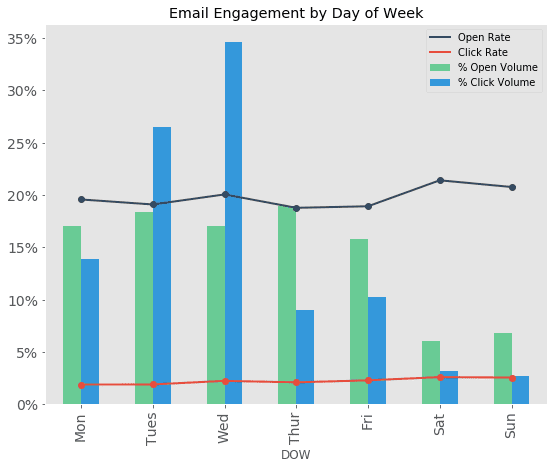
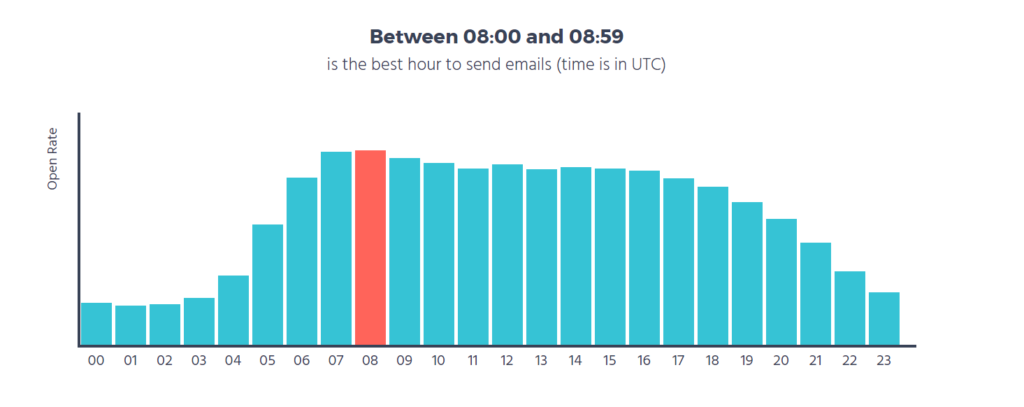
Moosend reported Thursday as the best day of the week in terms of the highest open rate, followed by Tuesday. The best time to achieve the highest email opens is 8-9 AM.
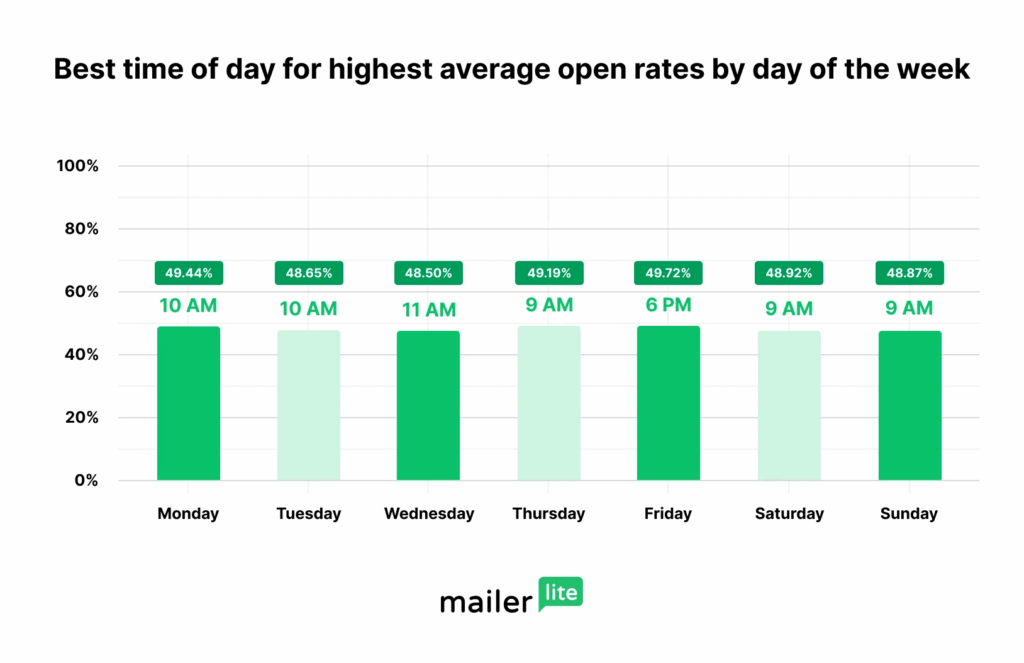
Mailerlite analyzed 2 million email marketing campaigns (not emails) and identified Friday as the best day and 6 PM for the highest email open rates. However, open rates on all the other weekdays peak at 8-11 AM:
You can scan other reports by leading email marketing platforms. There is a lot of data out there.
Ideally, you should do experimentation with different days and timings. Try finding the best day and time that works for your subscribers.
You can use the above data as a starting point.
Final Thoughts
Email open rate depends on a lot of other factors (that might not be included above), such as the ESP you are using, sender reputation, list hygiene, and others.
Most of these factors impact open rate indirectly such as list hygiene.
The ones covered above have the highest direct impact on open rate. It’s best that you start from those and then move towards the other ones.
Measure open rate and optimize your campaigns for improvement. This is the only way to get better than everyone else in your industry.
Featured Image: Unsplash