Blogging is amazing. But it gets better when you start using topic clusters for SEO.
The fact is: Most business blogs publish content at random.
It works, but it is not the best utilization of your resources and content.
Search engines no longer reward isolated pages. They now reward blogs that cover a subject thoroughly and make it easy to explore. That’s what topic clusters do.
This guide covers what topic clusters are, how they connect to SEO, and the exact steps to build one for your business.
What is a Topic Cluster?
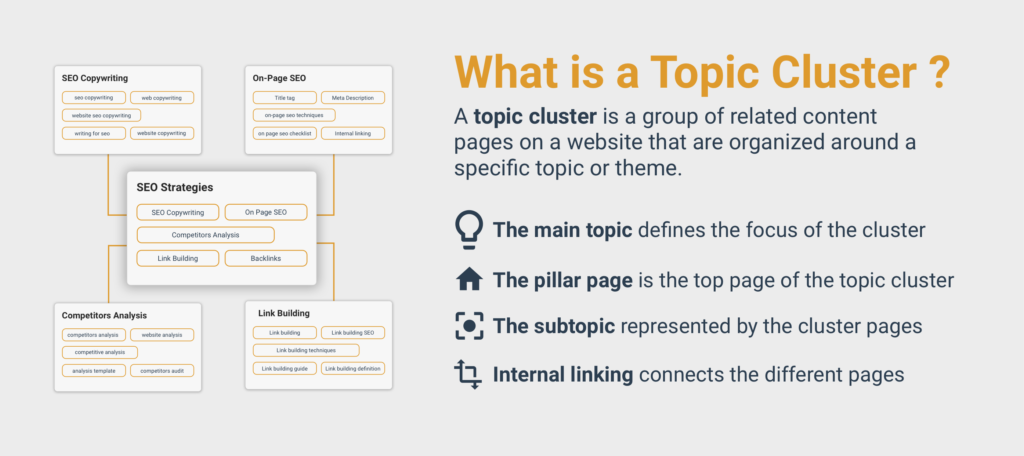
A topic cluster is a group of web pages built around one broad subject (topic). At the center sits a pillar page that covers the whole topic in detail. Cluster pages are linked to the pillar page, where each goes deep on one narrow question or subtopic.
And internal links hook them all together.
Here’s how it works:
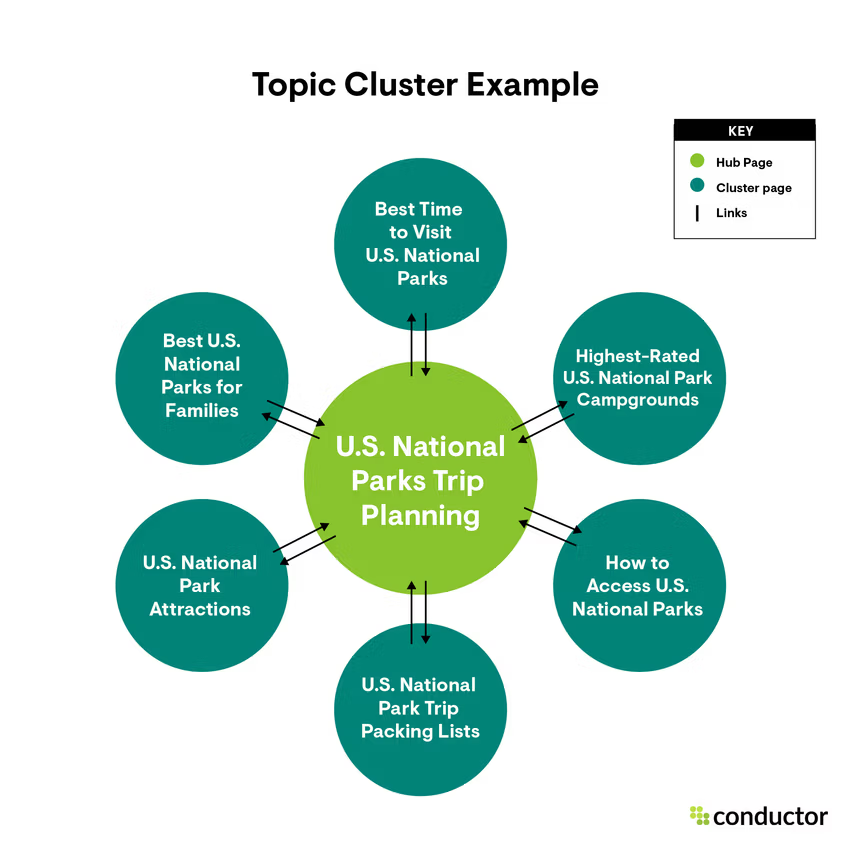
You don’t have to publish random articles. Rather, you start building a connected library on one subject.
This matters because search has changed.
Google no longer just matches keywords on a page. It tries to understand what a page is about and whether your site really knows the subject.
HubSpot popularized the model. Its research team published the approach in 2017 as a response to how search was shifting toward topics and user intent. They reorganized their own blog around it, and it has since become a standard content architecture for SEO.
The idea itself is simple. Organize content around subjects, not isolated keywords, and link it so the structure is obvious to both people and search engines.
Here’s the good news: You don’t need a huge site to do this. You can implement topic clusters for SEO right from day one.
The Three Parts of a Topic Cluster
Every topic cluster has the same three building blocks:
- Pillar page: A broad, comprehensive page that gives the big picture of a topic. It answers the main question, touches every major subtopic, and points readers to deeper resources. Think of a detailed guide on a topic that covers everything.
- Cluster pages: Focused pages that each cover one subtopic or long-tail question in depth. A cluster page covers a subtopic from the pillar page in detail. It doesn’t, however, have to be a repetition of what’s already covered in the pillar page, rather an extension in the form of depth, breadth, or both.
- Internal links: The glue. The pillar links out to every cluster page, and every cluster page links back to the pillar. The interconnected links work for both search engines and humans. You can also link related cluster pages to each other when it helps the reader.
Let’s take an example…
Imagine you run an online store selling specialty coffee beans. Your pillar page could be a complete guide to brewing coffee at home. It explains the main methods, the gear, the basics of grind size and water temperature, and common mistakes.
Your cluster pages would then go deeper on single questions like:
- How to make pour-over coffee
- French press vs. AeroPress
- Best grind size for each brewing method
- How to store coffee beans so they stay fresh
- Why does your coffee taste bitter?
Each cluster page links to the brewing guide. The brewing guide links to each of them. A visitor who lands on the bitter-coffee article can move to the pillar for the full picture, or jump to the grind size page for the fix.
Here’s how search engines see them: One topic, covered thoroughly, with clear relationships between the pages.
That’s a topic cluster.
Here’s another visual example for better understanding:
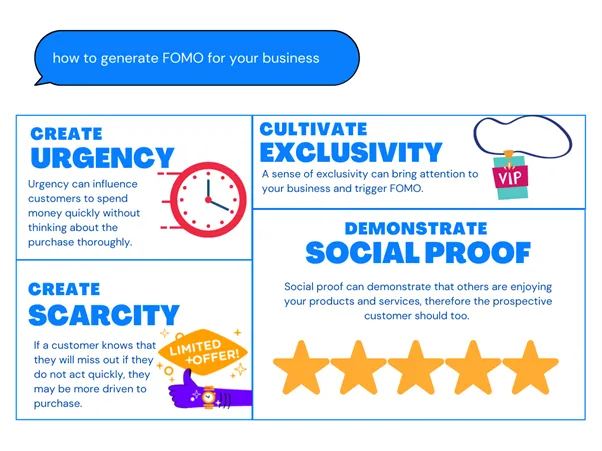
You get the idea, right?
Topic Cluster Vs. Pile of Blog Posts
Most business blogs grow the second way.
A post gets written because someone had an idea or a keyword looked promising.
Months later, there are 80 posts with no clear relationship, some competing against each other for the same search terms.
A topic cluster flips the process.
You decide the subject first, map every question your audience asks about it, and then write to fill the map. Nothing is random, and every page has a specific purpose.
Here’s how this switch pays off big time:
- Topical authority: Covering a topic in detail is an indication of expertise and search engines treat you as an authority in the niche.
- Higher rankings for related searches: Pages that support each other tend to lift each other primarily due to link juice. A solid interconnected network of similar pages is created that does more than organization.
- Easier navigation: Your target audience finds the next useful page without hunting for it. The same goes for web crawlers, they can find related pages easily.
- Less content overlap: A clear map prevents two pages from fighting for the same keyword. This has a massive impact for larger blogs. Cluster topics save and optimize resources.
- A reusable content plan: Your writing team always knows what to write next and why they have to write on a topic.
How Are Topic Clusters Related to SEO?
Topic clusters are an SEO structure. They organize your content the way search engines now read it (by topic, not by isolated keyword).
This shift started years ago.
In 2013, Google rolled out its Hummingbird update, which leaned on the Knowledge Graph so the search engine could understand relationships between concepts instead of simply matching (key)words on a page.
Since then, search has only gotten smarter at figuring out what a page means and whether a website covers the subject in detail.
And this is what can be best achieved with topic clusters…
How Topic Clusters Help SEO
A cluster improves SEO in several ways:
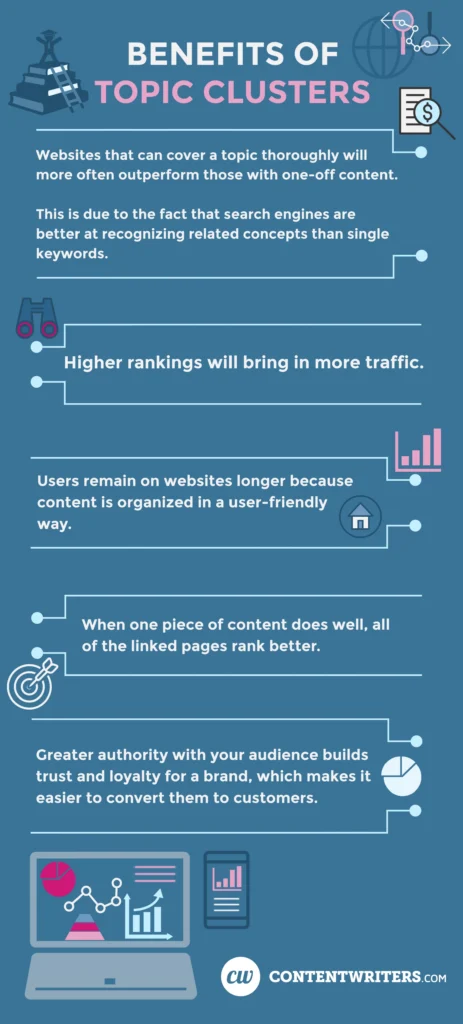
- Topical authority: When you cover one subject from every angle and interlink related pages, you show search engines that you understand the topic. HubSpot’s research describes this as the pillar page earning authority because related pages link back to it
- Better crawling and discovery: Google uses links as a signal of relevance and to find new pages. It also advises that every page you care about should be linked from at least one other page. A cluster does this by design, so no page is orphaned. This eventually improves crawling and makes it much easier for web spiders to find pages.
- Clear context: Descriptive anchor text helps both readers and Google understand what the linked page is about. Cluster links are natural places to use descriptive, relevant anchor text.
- Wider keyword coverage: Each cluster page targets a specific long-tail search query, so the cluster ranks for tons of related searches instead of one head term. Once you cover an entire topic completely, you rank for pretty much all the related keywords in SERPs.
- Less keyword cannibalization: Mapping topics first means each page has a well-defined purpose. This optimizes resources and you don’t end up targeting similar or even the same keywords when you have defined topic clusters.
It benefits end-users as well.
Someone who lands on one cluster page can move straight to the next useful one. More pages viewed and more time on site are good conversion signals, even though they’re not a direct ranking factor.
How to Get Started with Topic Clusters for SEO
Knowing what topic clusters are is the easy part. Building one is where most businesses fail. They aren’t sure which topic to pick, how many pages they need, or what to write first.
The step-by-step guide below will direct you in the right direction:
1. Choose Core Topic
Picking the topics for your blog is the first step.
And it is the most important phase.
Because everything else in your cluster rests on topics.
Pick a topic that’s too broad and you’ll never rank for it. Pick one that’s too narrow and you’ll run out of new content ideas. If topics don’t connect to what you sell, the traffic won’t convert.
A core topic is the broad subject your business wants to be known for. It acts as a pillar page for your future cluster.
Here’s why choosing at the topic level, not the keyword level, matches how search works:
- Most searches are long-tail. According to an Ahrefs study, keywords with fewer than 10 monthly searches make up almost 93% of all keywords. Most of what people type is specific and low-volume, and no single page can capture it.
- One strong page ranks for several searches. Ahrefs analyzed 3 million queries and found that the average #1 page also ranks in the top 10 for nearly 1,000 other keywords, with a median of around 400.
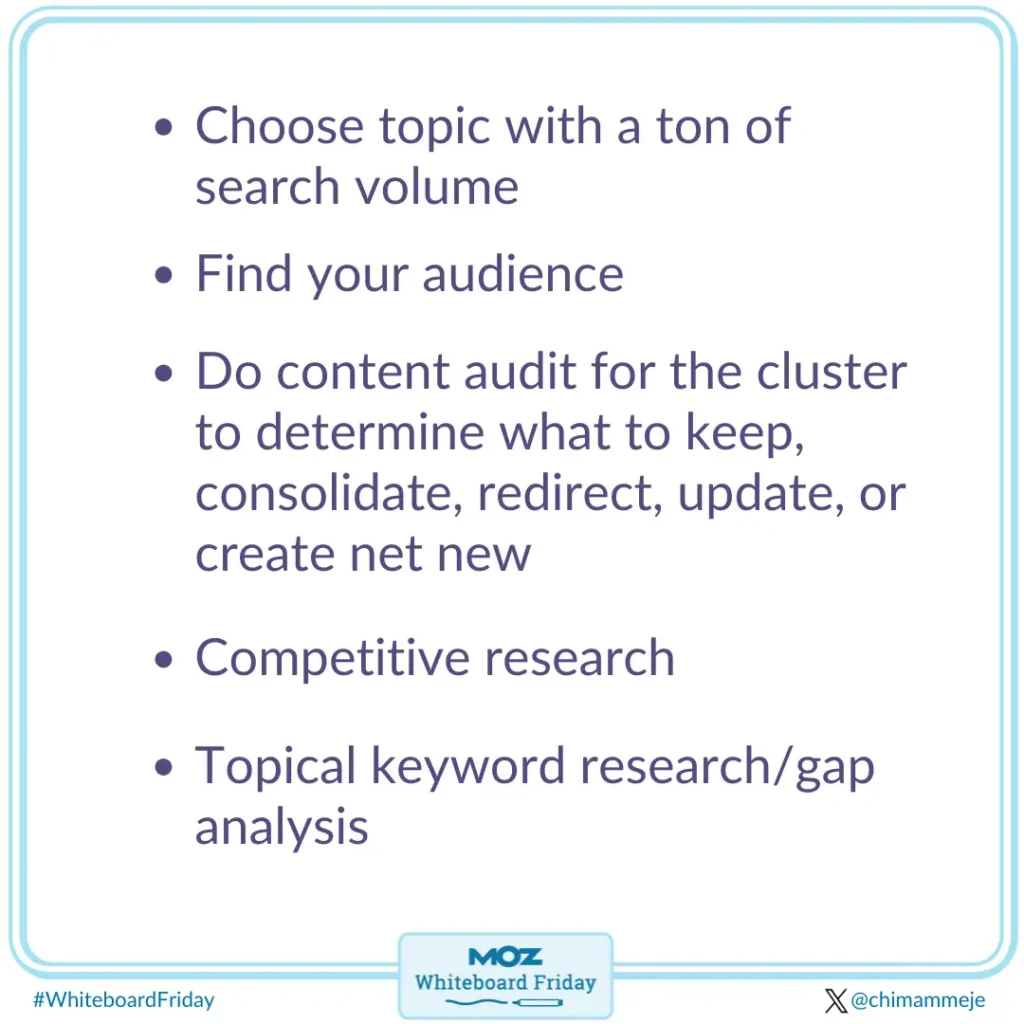
It shows that demand is scattered across thousands of small questions and search engines reward pages that answer a whole cluster of them. So, you don’t have to pick one keyword. Rather, you should pick a broad topic that is big enough to capture all the potential long-tail queries.
Steps to Selecting a Broad Topic
So, how do you choose a topic for clusters?
The steps below list the exact process you must follow:
Step #1: Start with your business, not a keyword tool.
I am not against keyword research. But this isn’t an area where you should dive into keyword research right away.
Start with your main products or services, the problems they solve, and the customers who pay the most.
Your topics should sit where your expertise and your revenue overlap.
Step #2: Collect data.
Figure out the core questions your audience actually has.
This requires much more than looking at analytics and buyer personas. You must take a step ahead and collect primary data. For instance:
- Questionnaires and surveys
- Interviews and focus groups
- Sales calls and customer emails
- Support tickets and live chat logs
- Google Search Console queries
- Reddit, Quora, and industry forums
- People also ask section in SERPs.

Group the questions that have the same subject. Those groups are your topic candidates.
Step #3: Make the topic specific.
“Coffee” is bland. Nobody will ever outrank the giants on it.
“Brewing coffee at home” is better because it has a clear audience and plenty of subtopics. Narrow it further if you’re a small brand.
You don’t have to pick anything based on the data. Once you get a list of topic candidates, you need to screen and filter them.
A good topic idea must have two characteristics:
- It has at least 8-10 distinct subtopics worth a full page each
- It’s narrow enough that you can credibly cover all of it.
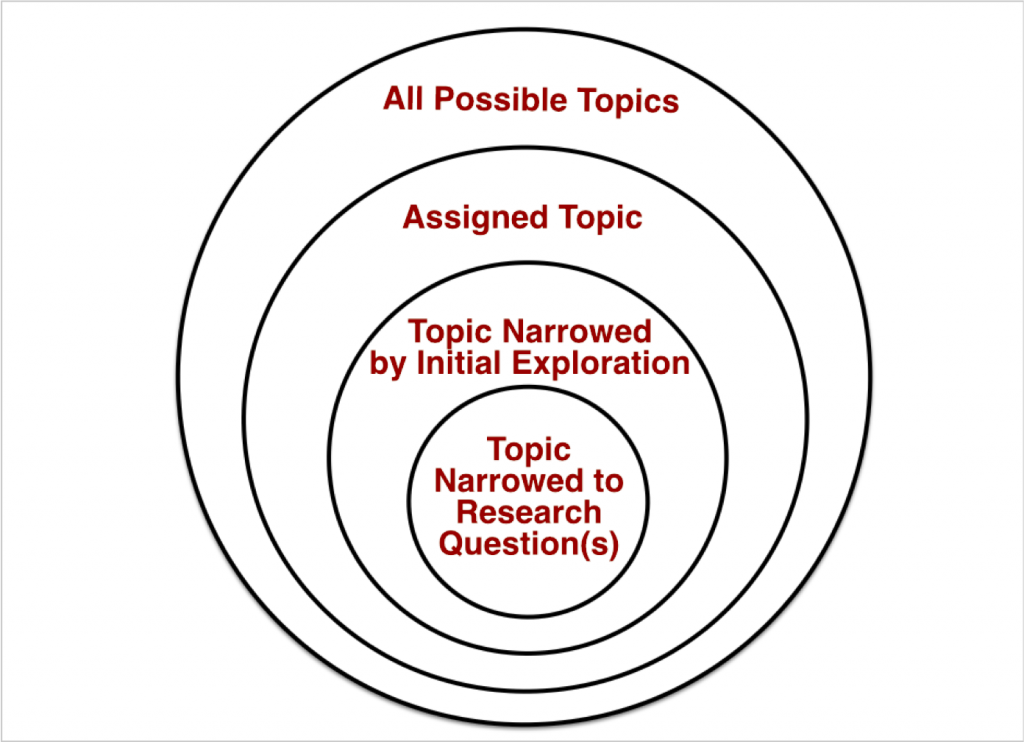
It has to be broad but not too broad that you end up competing with giants.
And it shouldn’t be too narrow that you struggle finding long-tail keywords for cluster pages.
Step #4: Check demand and competition.
This is where you can and should use relevant tools.
Run each candidate through a keyword tool such as Ahrefs, Semrush, or Google Keyword Planner.
Then search the topic yourself and look at page one. If it’s all government sites and household-name brands, pick a sharper angle.
If the results are thin or outdated, you’ve found an opening.
Step #5: Score your shortlist and pick one.
Rate each topic from 1 to 5 on these four factors:
- Business value: How close is it to a sale?
- Search demand: Do people look for it consistently?
- Competitiveness: Can you realistically compete on page one?
- Depth: Does it have enough subtopics to fill a cluster?
Add up the scores and start with the winner.
Stick with one cluster at a time.
Resist the urge to launch five clusters at once. Finish one, learn from it, and repeat.
2. Create Pillar Page
Topic selection is the most important step and that’s why I have covered it in detail. Once you are done with those, the rest is easy.
Next comes the pillar page.
Your pillar page is the hub of the cluster. It gives readers the big picture of your core topic and leads them to deeper pages for more details.
It touches every major subtopic, but doesn’t cover these topics in detail. Each subtopic then links to its own cluster page for the full story.
Here’s how to create a pillar page once you have finalized a core topic:
- Target the broad, main keyword. Use the core topic you chose in step one, such as “brewing coffee at home.”
- Outline from your subtopics. Turn each subtopic into an H2 or H3 section. If a section needs 1,500 words to do justice, that’s a cluster page, so give it a short summary and a link.
- Answer the main question early. Open with a clear definition or overview so readers and search engines know what the page is about.
- Make it easy to scan. Add a table of contents, descriptive headings, short paragraphs, and visuals like charts or checklists.
- Write it for beginners, then add depth. Cover the fundamentals first, then include expert tips that show real experience.
- Add a clear next step. End with a call to action tied to your business, such as a guide download, a demo, or a product page.
- Follow E-E-A-T guidelines to ensure search engines love your pillar page.
A few rules keep your pillar strong:
- Length follows the topic. There’s no magic word count. But generally, a pillar page has to be well over 2,000 words.
- Link to every cluster page with descriptive anchor text, not click here.
- Keep one pillar per topic. Two pillars on the same subject will compete with each other.
- Plan updates. Add new links and sections each time you publish a cluster page, and review the pillar every few months.
You don’t have to create the pillar before the cluster pages. You can publish a basic version of a pillar page and add more sections as you create supporting cluster pages.
It’s your choice.
3. Create Supporting Cluster Pages
Cluster pages are where your topic gets its depth.
Each one takes a single subtopic from your pillar and answers it completely, so the reader never needs to go back to Google.
Here’s how to build killer cluster pages for SEO:
- Turn each subtopic into a blog post. Every cluster page should target one specific long-tail keyword. These posts should go into detail and cover the topic completely.
- Match search intent. Check page one for your keyword. If the results are how-to guides, write a how-to guide. If they’re comparison lists, write a comparison article. Giving searchers the wrong format is the fastest way to lose them.
- Go deeper than the pillar. Include steps, examples, screenshots, data, and your own experience. The pillar gives the overview, and this page gives the full answer.
- Vary the formats. Mix how-to guides, comparisons, checklists, FAQs, and case studies. This covers different stages of the buyer’s journey.
- Add internal links. Add a link to the pillar page near the top using descriptive anchor text. Then link to two or three closely related cluster pages where it helps the reader.
- Update the pillar page. Each time a cluster page goes live, add its link to the pillar page right away.
Here’s an example of a pillar page and its relevant cluster pages:
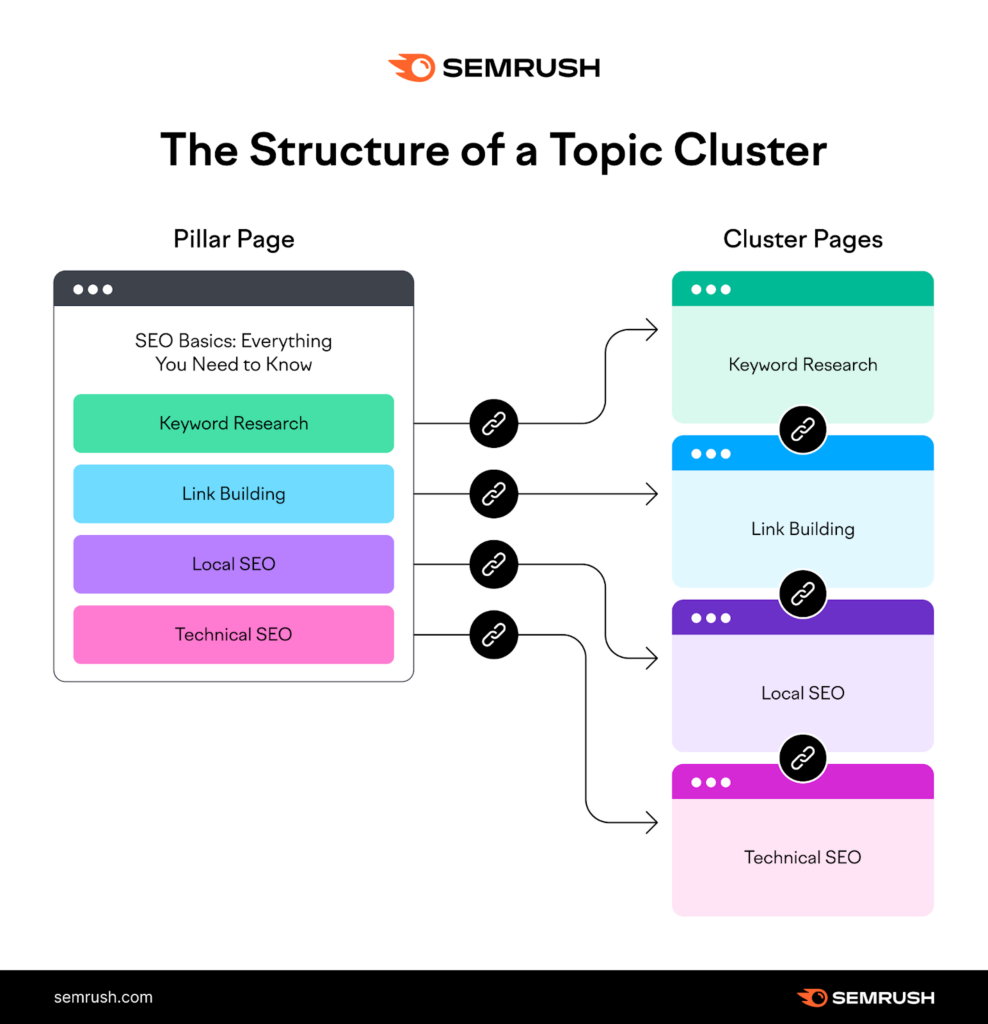
Notice how each cluster page covers one part of the pillar page in more detail and links back to it. This creates link juice that helps you improve ranking. That’s the whole point and function of topic clusters for SEO.
4. Implement Internal Linking
Internal links are the most crucial part of topical clusters for SEO.
They act as glue and help with search visibility.
Posts don’t become a cluster just because they share a topic. They become a cluster when a visitor, or a search crawler, can visit from any one of them to the others.
Here’s how you should structure pillar-cluster pages with internal links:
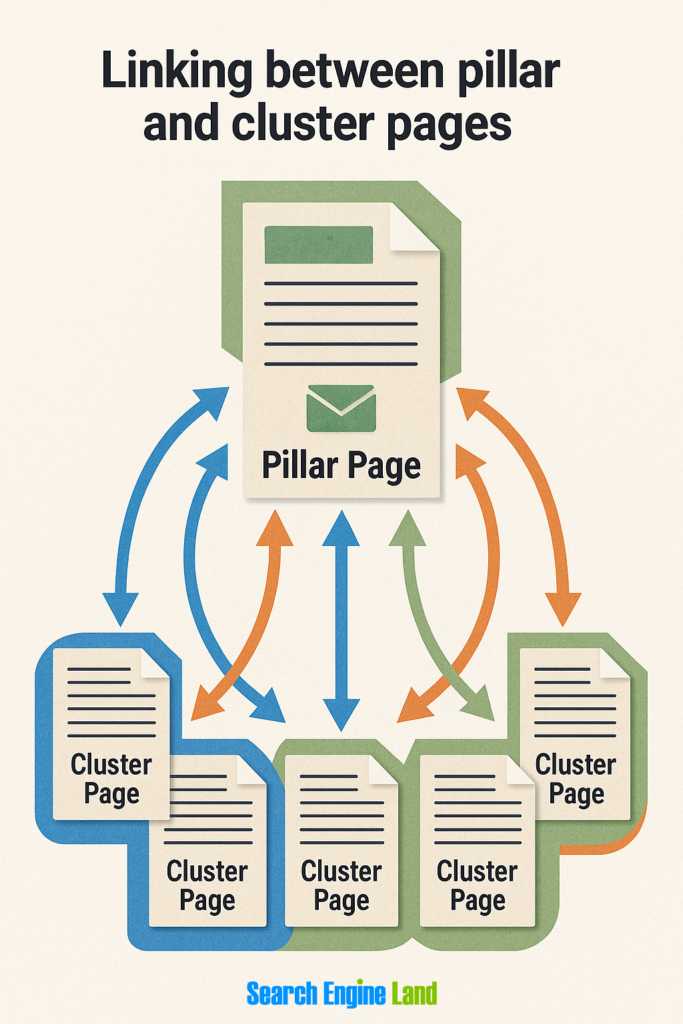
The cluster pages should be interlinked as well because that’s how you pass link juice, which works like this:
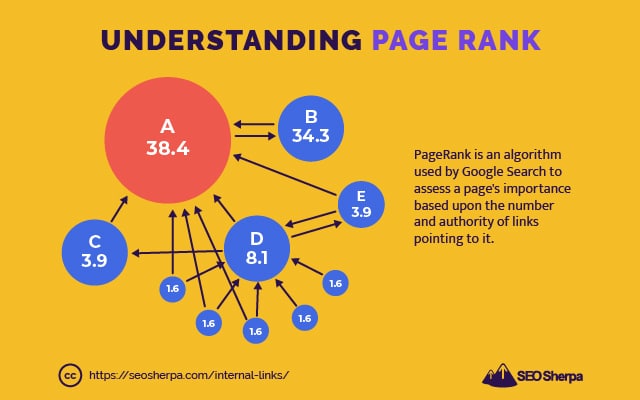
That’s how you set up your blog for better search engine ranking.
Ideally, every cluster needs traffic flowing three ways:
- Pillar to cluster: Each section of the pillar that summarizes a subtopic should link to the page that covers it fully. This is how authority and readers flow outward.
- Cluster to pillar: Every cluster page sends readers back to the overview. Add this link early, ideally in the first few paragraphs, where it gets seen.
- Cluster to cluster: Link sideways when one post naturally raises a question another answers. Only add these when the connection is real.
5. Track Performance
Finally, you need to monitor the performance of topic clusters for SEO to see how it’s working.
You need to measure the performance of individual cluster articles and the collective unit per topic that includes the pillar and all cluster pages.
So what to measure and how to track it accurately?
The first step is setting up analytics correctly. You need to group URLs based on the topics they cover. This gives you a better idea of how each cluster set performs collectively as well as individually.
Once you have the data pulled from Google Analytics, Search Console, and any other third-party tool, here’s what you should specifically measure:
- Impressions: This tells you if published content is getting impressions for the right keywords. Look this up in Search Console.
- Unique queries: It shows how broadly the cluster ranks beyond its main keyword. You get to see all the queries a given page ranks for.
- Clicks and average position: Figure out the average position in Search Console and exact ranking via third-party SEO tools. Clicks and CTR might not be visible too early, but they indicate if impressions are bringing in visitors and at what rate.
- Engagement rate and pages per session: You can check these in GA4. These metrics show whether readers move through the cluster.
- Conversions from organic traffic: This is usually visible later, once you have conversion data. It tells you if organic visitors convert and at what rate.
Most of this data might not be available instantly, so you have to wait at least 1-2 months after publication.
What’s important is how you use this data for decision-making and improving your topic clusters for SEO strategy.
For instance, high impressions but low clicks mean you should rewrite the title and meta description. Or, a page that’s stuck below page one needs to be expanded as it’s missing key insights that search engines aren’t able to find.
Review cluster performance monthly for the first six months, and then switch to quarterly analysis. Tweak individual articles, clusters, and your strategy based on performance.
Final Words
Topic clusters work in two ways.
First, they help you organize and structure content. You might not see an issue when your blog is small. But as it grows, organization plays a big role.
Second, and importantly, topic clusters are best for SEO. It’s much more than interlinking. The structure, links, content depth, and topical authority collectively help you get better search visibility.
Start small.
One well-built cluster provides you with more meaningful data than several unfinished ones. The idea is to pick one topic and complete it before moving to the next.
Don’t expect results overnight. Organic traffic takes time, and by time, I mean years, not just months. The real fun is in the compounding effect.
Each new page strengthens the ones around it, and your site gradually becomes the go-to resource on multiple connected subjects.
Choose your first topic and get started.
Featured image: Unsplash